
BetPro360 App: Safe Essential APK Download Guide 2026
BetPro360 App: Safe Essential APK Download Guide 2026
TL;DR
The BetPro360 app gives Android users a mobile way to access the BetPro360.net platform. This guide is about BetPro360.net, not BetPro360.com. Those are different products. The .com site focuses on football predictions, while BetPro360.net currently shows a “Download App” option.
For users in Pakistan, the safest approach is simple. Start from a verified BetPro360.net or BetGuide.pk route. Do not search random APK sites, Telegram groups, or forwarded WhatsApp messages for the file. A similar name or logo does not prove that an app is the right BetPro360 app.
After downloading the APK, let Android show its normal security checks. Keep Google Play Protect active. Review app permissions. If the app will not install, check storage, the downloaded file, installation permission, and whether an older copy is causing a conflict. Google says Play Protect checks apps for potentially harmful behavior, including apps obtained from outside Google Play.
Already have an account? Use the registered login details connected to BetPro360.net. Need an account first? Use our BetPro360 Pakistan account guide instead of creating a second account by mistake.
The key rule is: verify first, install second, and log in only after you know which app you are using.
Context
What Is the BetPro360 App?
The BetPro360 app is an Android access option connected with the BetPro360.net platform. The current BetPro360.net home page displays a “Download App” option, which confirms that mobile app access is part of the platform experience.
For Android users, this kind of app may be supplied as an APK. APK stands for Android Package Kit. It is a file format Android uses to install an application.
An APK is not automatically unsafe. However, an APK downloaded outside Google Play needs more care because the user is responsible for checking the source. Android includes security features that can warn about potentially harmful apps.
This guide focuses on the practical questions Pakistani users ask most often. Where should you get the BetPro360 app? How do you install it? How do you log in? What should you do if it will not install? How can you avoid downloading the wrong BetPro product?
We will answer those questions without pretending that every Android phone uses the same menus. Settings can differ by device.
BetPro360.net and BetPro360.com Are Different
This difference matters before you download anything.
BetPro360.net is the platform covered by BetGuide.pk. It currently presents account access and a Download App option.
BetPro360.com is a separate website. Its current site describes itself as a football prediction service and publishes prediction content. It is not the product we mean when we say BetPro360 app in this guide.
The names are very similar. That can cause search confusion. A user may search “download BetPro360 app” and open a result connected with a different product.
Do not use the logo alone to decide. Check the full domain. Read what the page actually offers. Make sure the account system matches the platform you already use.
If you have a BetPro360.net account, your goal is to access the app connected with that account. You do not need a prediction-service account from a different domain.
Do Not Confuse Similar “BetPro” Apps on Google Play
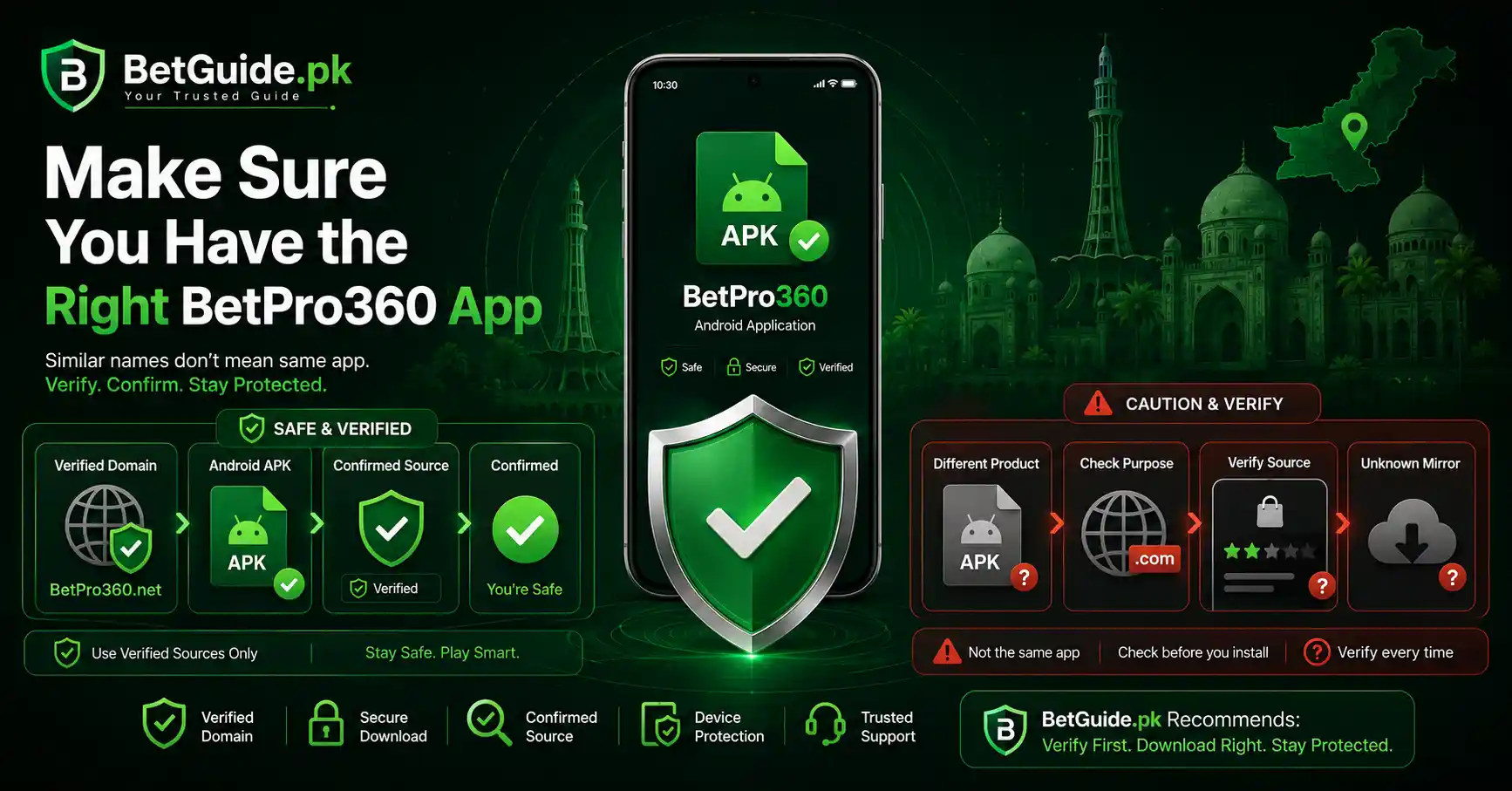
A similar app name does not always mean the same product.
Google Play currently lists an app called “BetPro App.” Its listing says the app is designed to submit payment proof, including payment details and images. That description is different from the BetPro360.net platform app discussed in this guide.
A search result alone is not enough evidence.
Before installing any app, ask three questions. Does the source connect to BetPro360.net? Does the purpose match the platform you use? Does the download route come from a page you have verified?
If the answer is unclear, stop before entering your ID, password, OTP, or payment information.
Why the BetPro360 App Search Intent Matters
People searching for “betpro360 app” are usually not looking for a long platform review. They want an action.
Some want the BetPro360 app download. Some need the Android APK. Some already installed it and need the BetPro360 app login. Others search for the latest version because an older file stopped working.
That is why this page stays focused on app access.
For account creation, registration, password recovery, and broader platform details, use our BetPro360 Pakistan account guide. Keeping those topics separate helps you reach the right answer quickly.
What Works
How to Download the BetPro360 App in Pakistan
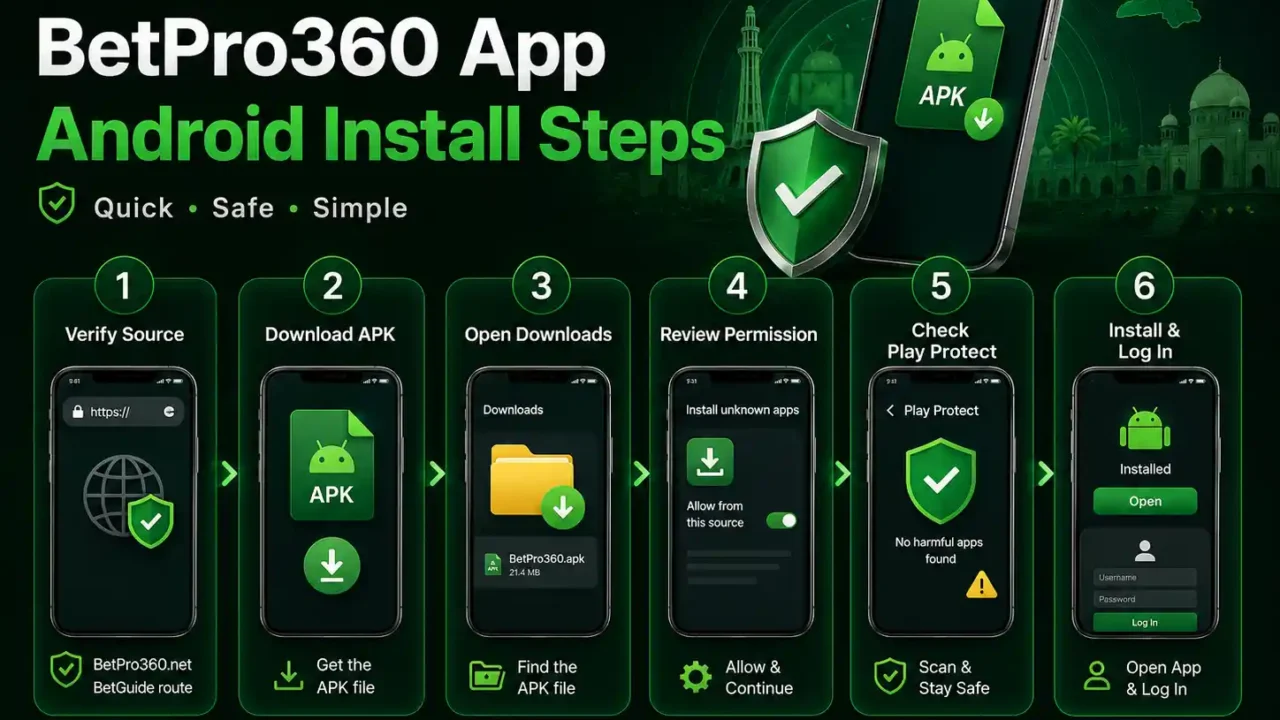
Start from a route you can verify.
The safest path is to open the BetGuide.pk BetPro360 page or the confirmed BetPro360.net platform and use the app option provided there. Avoid searching for “BetPro360 app download free” and choosing the first unknown APK mirror you see. BetPro360.net currently presents its own Download App option.
A third-party download page may use the correct name but provide an old, modified, or unrelated file. A logo cannot prove it.
Before you tap download, check the full web address. Make sure there are no extra letters, unusual subdomains, or misleading words designed to look official.
Then start the download.
Android may warn you because the file comes from outside Google Play. Read the warning. Do not turn off security tools just because a website tells you to. Google specifically advises users to be careful with apps obtained from unknown sources.
When the download finishes, keep the file in the normal Downloads folder. This makes it easier to find and delete later if the installation fails.
If your phone blocks the download completely, do not immediately change every security setting. First confirm that you are using the intended file and source.
BetPro360 App Download for Android
The BetPro360 app download intent is mainly Android-focused because an APK is an Android installation file.
If you use Android, make sure your phone has enough free storage before you download the file. Low storage can cause incomplete downloads or failed installation.
Use a stable internet connection. A broken or partial APK may fail to open.
Do not rename the file unless you have a clear reason. Keeping the original file name can make troubleshooting easier.
After downloading, scan the phone with the security tools already built into Android. Google Play Protect can check apps and may warn about harmful behavior.
If you see a strong security warning, do not ignore it just to complete the installation. Stop and verify the source again.
How to Check a BetPro360 APK Before Installing
You do not need to be a developer to make basic checks.
First, check where you downloaded the file. A verified source matters more than an attractive download button.
Second, look at the file extension. An Android installation file should end in .apk. A ZIP, EXE, document, or unknown file type is not the Android app you expected.
Third, check whether the download finished. An unusually small or incomplete file may not install.
Fourth, pay attention to the permissions requested during or after installation. Android lets users review and change app permissions. If an app asks for access that seems unrelated to its purpose, do not approve it automatically.
Fifth, keep Play Protect running. Google says Play Protect checks apps for potentially harmful behavior and can warn users about apps from other sources.
These checks do not prove a platform is risk-free. They reduce avoidable installation and security mistakes.
How to Install the BetPro360 APK on Android
Once you have verified the source, open the downloaded APK.
Your Android phone may tell you that the browser or file manager is not allowed to install unknown apps. This is normal when an APK comes from outside Google Play.
The exact menu differs by phone. In general, Android allows installation permission for the specific source app, such as the browser or file manager you used.
Allow installation only for the source you trust. You do not need to give every app permission to install other apps.
Return to the APK and continue.
Read the information Android shows before you select Install. If the phone gives a security warning, take it seriously.
After installation, open the BetPro360 app.
If Android offers a permission request, read it instead of tapping Allow on everything. Grant only the access you understand and need.
If the installation completes successfully, you may remove the downloaded APK file later to save storage. Removing the installer normally does not remove the installed app.
BetPro360 App Login: How to Sign In
Already have a BetPro360.net account? Use the account details connected with that platform.
Open the installed app.
Enter your registered ID, username, or other login detail requested by the current form. Then enter your password carefully.
Check Caps Lock if your keyboard provides it. Watch for spaces added before or after copied text.
Select Login and wait for the account area to load.
After login, check the account name or details shown on screen. This is a simple way to make sure you entered the intended account.
Do not save the password on a shared phone.
If you do not have a BetPro360 account yet, do not create random accounts through third-party APK pages. Visit our BetPro360 Pakistan account guide for the current registration path.
If you forgot the password, use the recovery option connected with the verified BetPro360.net account flow rather than sharing your password or OTP with an unknown person. BetGuide’s current parent guide documents the platform’s Forgot Password flow.
BetPro360 App Kaise Use Kare?
Agar aap BetPro360 app use karna chahte hain, pehle correct source se APK download karein. Random WhatsApp message, Telegram group, ya unknown APK website se file install na karein.
APK install hone ke baad app open karein. Apni registered BetPro360.net ID ya username aur password enter karein. Login karne ke baad account details check karein taake confirm ho ke sahi account open hua hai.
Agar website par login ho raha hai lekin app par nahi, foran password change na karein. Pehle ID spelling, password typing, app version, internet connection, aur saved login details check karein.
Agar app install nahi ho rahi, phone storage check karein. Download dobara verify karein. Android ki installation permission bhi check karein.
Kisi unknown person ko password, OTP, recovery code, wallet PIN, ya phone PIN share na karein.
Agar naya account chahiye, BetPro360 Pakistan guide use karein. Agar sirf app ka masla hai, isi guide ke troubleshooting steps follow karein.
How to Update the BetPro360 App to the Latest Version
Users often search for “betpro360 app download latest version.” The phrase sounds simple, but version claims can become outdated very quickly.
Do not trust a version number only because another website put “latest” in its title.
Use the current verified download route. If the platform or BetGuide.pk updates the file, that route should remain more useful than an old article that hard-codes a version number.
Before updating, check whether the installed app works.
If the platform gives an update prompt, read it carefully. Confirm that it points to the expected source.
You may be able to install a newer APK over the existing app. Android behavior can depend on the package and signing information. If the update fails, do not delete the old app immediately if you need information stored locally.
First, check storage. Then download the APK again from the verified route. Make sure the file completed.
If you still cannot update, use the website as a fallback while you troubleshoot. A working web login can also help you confirm that your account itself is fine.
Should You Delete the Old Version First?
Not as your first move.
Deleting the existing app can remove local settings, cached data, or saved login information. It may not fix the actual problem.
Try the normal update path first.
If Android reports a package conflict or the provider specifically instructs you to reinstall, note anything you need from the app before removing it.
Make sure you know your login details.
Then uninstall and reinstall only after you have verified the current APK source.
BetPro360 App Not Installing? Try These Fixes
An APK can fail for several reasons. The error does not always mean the app is broken.
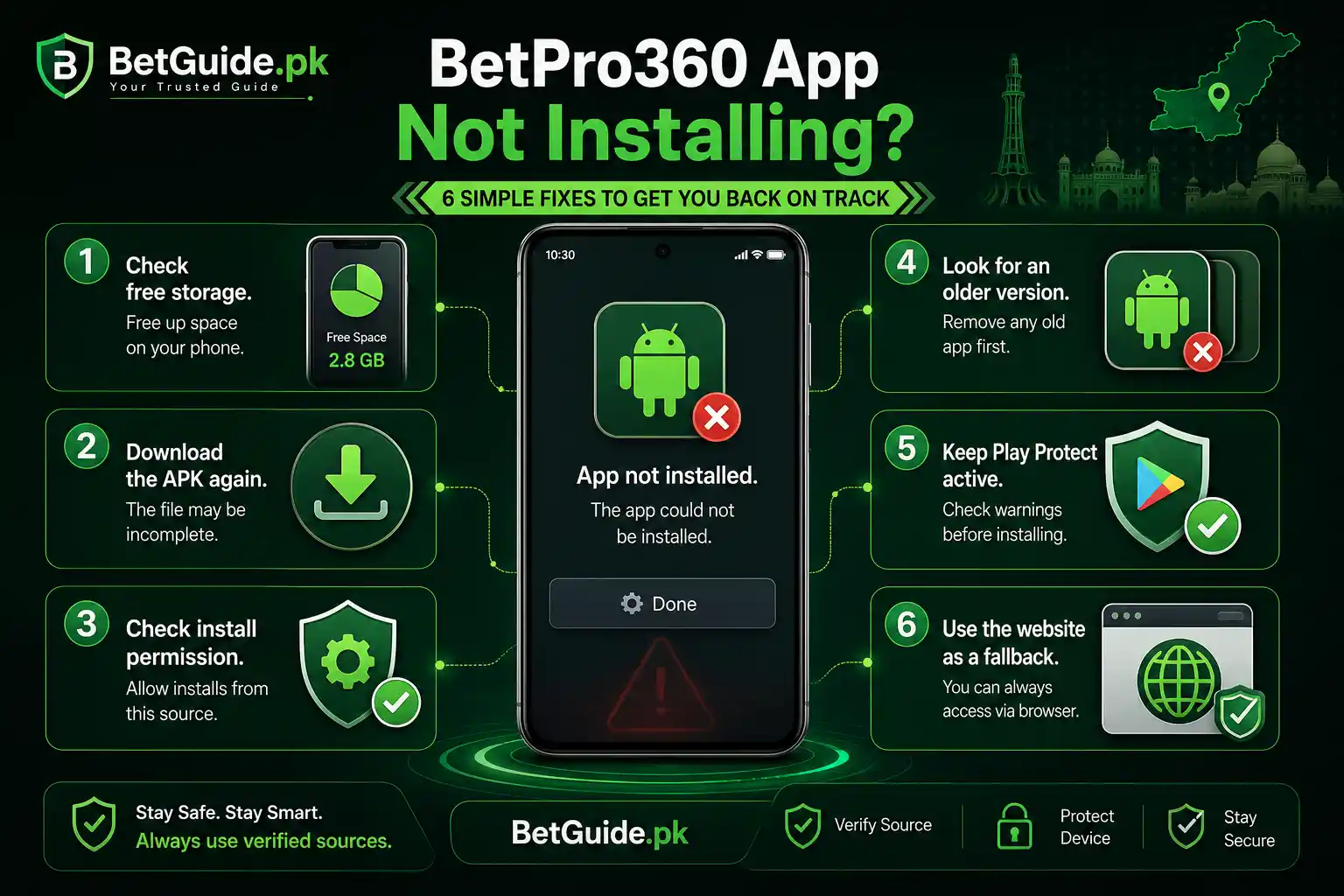
Start with free storage. Delete unneeded files or apps if the phone is nearly full.
Next, download the APK again. A failed connection can create an incomplete file.
Check installation permission for the browser or file manager you used. Android may block that source until you approve it.
Look for an older version already installed. A package conflict can stop a new installation.
Restart the phone. This simple step can clear temporary problems.
Make sure the Android system is reasonably current for your device.
Keep Play Protect active. If Play Protect warns that the file may be harmful, do not bypass the warning without understanding why it appeared. Google says Play Protect can warn about, disable, or remove potentially harmful apps.
If none of these steps works, use BetPro360.net in your browser while you confirm the current app file.
“App Not Installed” Error
If Android shows “App not installed,” check storage, download the APK again, confirm permission for the source, and look for an existing conflicting version.
Do not disable security software as your first fix.
If the same verified file fails on a supported phone after a fresh download, the APK itself may need an update. Use the website until a current file is available.
APK Downloads but Will Not Open
First, confirm the file really ends in .apk.
Open it from your Downloads folder or file manager.
If nothing happens, your browser may not have completed the file, or Android may be blocking the action.
Download it again from the verified route.
Do not install a different APK from an unknown mirror simply because the first file did not open.
BetPro360 App Keeps Closing
Restart your phone first.
Then check available storage and close other heavy apps.
If the problem started after an update, confirm that you installed the current file from the expected source.
You can also review the app settings on Android. Clearing cache may help with temporary files, but do not clear all app data unless you understand that it may remove saved information.
If the app continues to close, use the web version and wait for a verified app update or support answer.
BetPro360 App Login Not Working
Separate an app problem from an account problem.
If the app will not open, you have an installation or device issue.
If the app opens but rejects your login, check the ID and password.
If the same ID and password work on BetPro360.net in your browser, the account is probably accessible and the problem may be app-specific.
If both the website and app reject the login, focus on account details, password recovery, domain verification, or account status.
Do not repeatedly guess passwords.
Do not create a second account just because the app login fails.
Do not give an unknown support contact your password or OTP.
Use the confirmed account recovery or support route when needed.
BetPro360 App Works on Website but Not Android
This is a useful test.
Open BetPro360.net in the phone browser.
Try the same registered account details.
If the browser login works, you have confirmed two things. Your account can still be accessed, and your password is likely correct.
Now return to the app.
Retype the credentials instead of using old autofill. Check whether the app needs an update. Restart it. Confirm that you installed the intended BetPro360 app.
If the app still fails, keep using the website until the app issue is resolved. There is little value in changing a working password to solve a software problem.
Trade-offs
BetPro360 App vs Website: Which Is Better?
The app can be convenient. It gives Android users a direct icon on the phone and may feel faster for repeat access.
The website has a different advantage. You do not need to install an APK or manage app updates. You can open the verified domain in a browser and sign in.
If phone storage is low, the website may be simpler.
If an APK update fails, the website provides a useful fallback.
If you prefer app access, verify the file source and keep Android security features active.
There is no need to choose one forever. The right option depends on your phone, your security habits, and whether the current app works well on your device.
Is the BetPro360 App Safe to Download?
No independent guide should promise that an APK or platform is “100% safe.”
What you can do is reduce avoidable risk.
Use the verified source. Check the full domain. Keep Google Play Protect active. Review permissions. Avoid modified APK files. Never install an app because a stranger promises a bonus, free balance, special account, or guaranteed result. Google recommends keeping Play Protect enabled and notes that apps from unknown sources can carry higher risk.
Remember that app security and platform risk are different questions.
A file can install successfully and still not prove that every payment request, account provider, or platform outcome is safe. BetGuide.pk does not operate BetPro360 and does not guarantee withdrawals, results, or profits.
Use only money you can afford to lose. Follow local rules and the platform’s age requirements.
Why We Do Not Recommend Random APK Mirrors
An APK mirror can create extra uncertainty.
You may not know who uploaded the file. The version may be old. The package may have been changed. The page may copy branding from another site.
A mirror can also rank for terms such as “betpro360 app download apk latest version” even when the publisher has not verified the current platform file.
That is why our advice stays simple. Start from the current platform or BetGuide.pk route. If that route is unavailable, wait and verify instead of replacing certainty with a random download.
Next Steps
BetPro360 App Quick Start
If you need the BetPro360 app, begin with a verified BetPro360.net or BetGuide.pk route.
If you downloaded the APK, check the source and let Android run its normal security checks.
If the APK will not install, check storage, the file, installation permission, and version conflicts.
If the app installs, use the registered BetPro360.net login details.
If login fails in the app, test the same account on the website. This helps you separate an app problem from an account problem.
If you need a new account, use our BetPro360 Pakistan account guide instead of opening an unrelated account through a download page.
If you see another BetPro-branded app, check its purpose before installing. A similar name does not prove that it is connected with BetPro360.net.
How Do I Download the BetPro360 App in Pakistan?
Use the current verified BetPro360.net or BetGuide.pk app route. Download the Android APK, keep Play Protect active, and review any installation warning or permission request. Avoid APK files shared through unknown websites, groups, or unsolicited messages.
Is the BetPro360 App Available on Google Play?
BetGuide.pk currently treats the BetPro360.net mobile app as an Android APK download. Google Play does list other apps with similar BetPro names, including one focused on payment-proof submission. Do not assume a similar name means it is the BetPro360.net platform app.
What Is the Latest BetPro360 App Version?
Use the current verified download route instead of relying on a hard-coded version number in an old article. APK versions can change. If your installed app works, do not reinstall it only because another website claims to have a “latest” file.
Conclusion
Need Help With BetPro360 App Access?
If the BetPro360 app is not downloading, installing, or accepting your login, start with the troubleshooting steps above. Most problems become easier once you know whether the issue is the APK, the phone, or the account.
Need a BetPro360 account instead? Read our BetPro360 Pakistan account guide for registration, login, password recovery, and platform guidance.
You can also use the WhatsApp help button on BetGuide.pk for guidance. Describe the problem clearly. Never send your password, OTP, wallet PIN, recovery code, or phone PIN to an unknown contact.
BetGuide.pk is an independent information website. It does not operate BetPro360, hold customer balances, process bets, or guarantee withdrawals or winnings.
Use betting services only if you meet the legal and age requirements that apply to you. Set limits before you play. Do not borrow money to bet. Never treat betting as a guaranteed way to make income.
For app access, keep one rule in mind: verify the source, protect your account, and use the website as a safe fallback when the BetPro360 app is not working.