
BPExch Wallet: Essential Safe Access Guide for Pakistan
BPExch Wallet: Essential Safe Access Guide for Pakistan
TL;DR
BPExch Wallet is a search phrase that can point to more than one thing: the balance connected with a BPExch/BetPro account, a wallet-style account portal, or an app presented under a similar name. BetGuide.pk can confirm that the BPExch access flow it covers belongs to the BetPro Exchange account ecosystem and uses the issued BetPro ID credentials. It cannot confirm that every separate website, app, APK, or signup page using “BPExch Wallet” belongs to that same account flow.
If you already have a valid BetPro ID, do not assume you need a second wallet account. Start from the BPExch Pakistan guide, confirm the access route you already use, and check your account details before entering credentials elsewhere. For a login problem, use the dedicated BetPro Wallet Login guide instead of creating a duplicate account.
Treat wallet access and payment instructions as separate checks. A page can use familiar branding without proving that its deposit recipient, withdrawal process, APK, minimum amount, approval time, OTP flow, or verification requirement applies to your account. Never share a password, OTP, wallet PIN, banking PIN, email password, or recovery code with an unknown contact.
For Android downloads, keep Google Play Protect enabled and avoid APK files from unknown messages or third-party mirrors. If a route cannot be verified, use the confirmed web access while you check the guidance.
Context: BPExch Wallet
What Is BPExch Wallet?
The phrase BPExch Wallet is used broadly online, which is exactly why it can be confusing. Some pages use “wallet” to mean the money balance inside an account. Others use the same words for a separate portal that offers login, registration, payment requests, support, or an Android download. Those models are not automatically interchangeable.
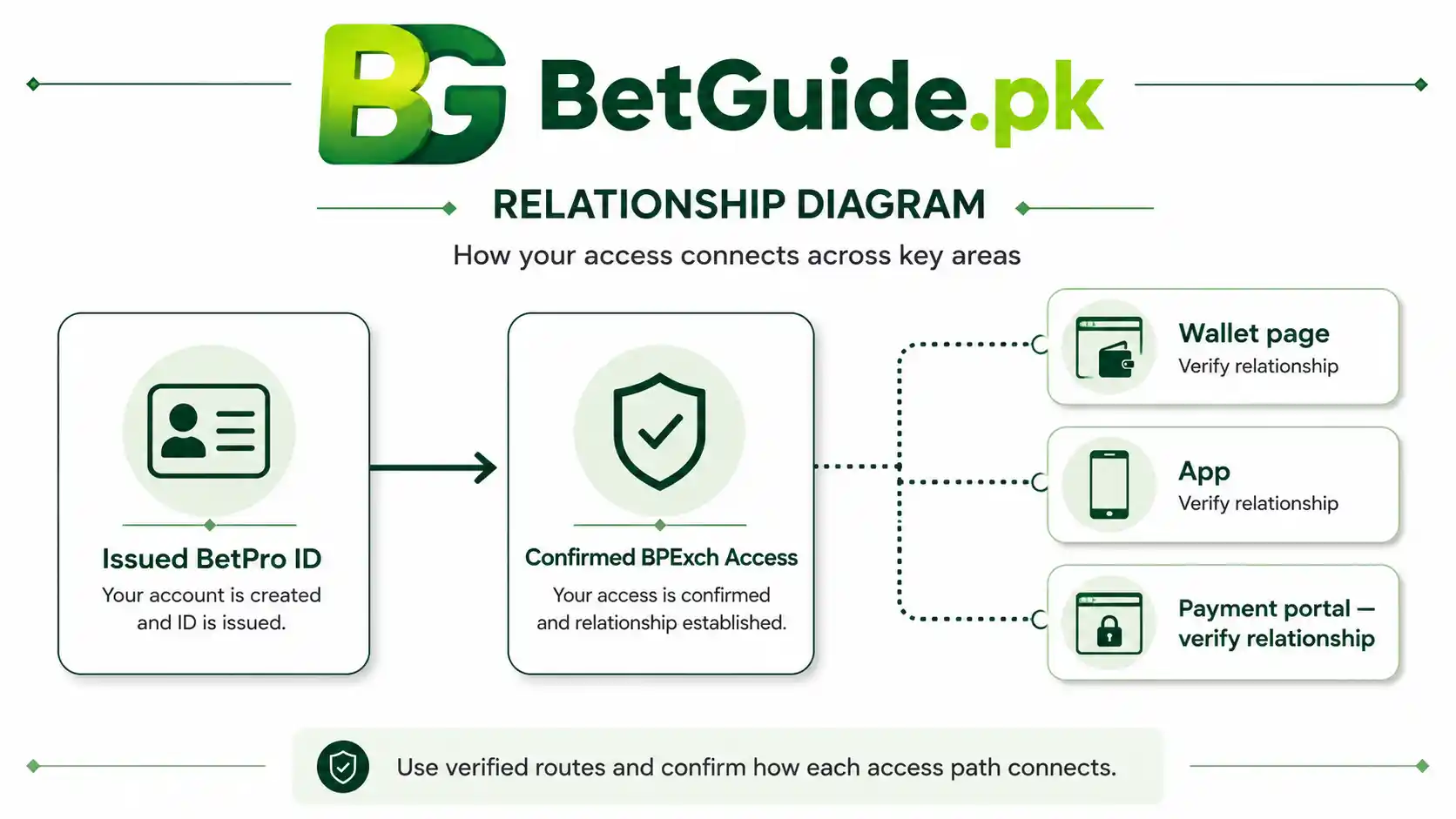
For the BPExch account ecosystem covered by BetGuide.pk, the core identity is the issued BetPro ID. The BPExch Pakistan page confirms that the same issued username and password are used across the confirmed BPExch access domains. A wallet-related page should therefore be assessed in relation to that known account model rather than treated as genuine because of its name.
Is BPExch Wallet a Separate Account?
Not necessarily. A person who already has an issued BetPro ID should not assume that seeing a BPExch Wallet signup page means another account is required.
The first question is whether the page is part of the same account flow you already use. If your existing BPExch access works with the issued BetPro username and password, a new registration request deserves scrutiny. It may be a separate service, a support portal, a different product, or simply a page that uses overlapping branding.
A separate login can also use different identifiers. For example, a portal may ask for an email address or phone number while the confirmed BPExch platform login uses a username and password. That difference does not automatically prove fraud, but it does mean you should stop and identify the service before entering information.
For detailed account-creation ownership, use the BetPro ID Pakistan guide. If you already hold valid credentials, the safer starting assumption is that you need access help, not another account.
BPExch Wallet vs BetPro Wallet
BPExch and BetPro are connected in the account ecosystem covered by BetGuide.pk, but search language does not always mirror the platform’s internal naming. Users may search BPExch Wallet when they mean their BetPro balance, a payment page, a wallet app, or a login area.
That does not mean every BPExch Wallet result and every BetPro Wallet result are the same service. The practical test is the account relationship. Does the page recognize the issued credential model you already use? Does it connect back to a confirmed access route? Does it ask you to create a second account or send money somewhere new?
BPExch Wallet Pakistan: Why Results Differ
Today, brand-like search phrases attract pages that describe themselves in different ways. One may present BPExch Wallet as a balance-management tool, another as an independent signup portal, another as an APK, and another as a cashier or payment dashboard.
The problem is not simply that the designs differ. The required credentials, payment steps, account creation flow, and security claims can differ as well. When those details conflict, the safest response is not to choose whichever page appears first. It is to compare the page against what you can already confirm about your own account.
Search position is not proof of ownership. Even a page that uses the exact phrase BPExch Wallet should be verified before you enter a password, phone number, identity document, payment proof, or banking details.
What Works
Start With the BPExch Account You Already Have
Existing users should begin with their known account, not with a new wallet signup. Open a confirmed BPExch access point from the main BPExch guide and check whether the issued username and password still work.
If the account opens normally, you have established an important fact: your existing credentials are valid. That makes it easier to judge a separate BPExch Wallet page that suddenly asks for a different identity or a new registration.
If login fails across confirmed access points, move to account recovery rather than creating replacements. The BetPro ID Password guide covers password and recovery questions, while the wallet-login article handles the narrower wallet-access problem.
Keeping one account identity reduces confusion. Duplicate accounts can make it harder to understand which credentials, balance, provider, or payment instruction belongs to which service.
BPExch Wallet Login: Know Which Credentials You Are Using
A BPExch Wallet login request should be read carefully. The confirmed BPExch platform flow uses the issued BetPro username and password. A different page may ask for email, phone number, OTP, or another password because it is a different portal.
Do not force your BetPro credentials into every page that contains the BPExch name. Before typing anything, ask what service the login is supposed to access.
If you are trying to enter the normal BPExch/BetPro account, follow the known platform route. If you are trying to reach a separate wallet portal, first confirm who operates it, how it relates to your platform account, and whether you intentionally created an account there.
For detailed wallet login steps and troubleshooting, use BetPro Wallet Login. That keeps password and access recovery in one place instead of duplicating instructions across multiple articles.
What Does “BPExch Wallet App” Mean?
“BPExch Wallet app” is another phrase that can describe different products. A user may mean an Android interface for account access, a payment-support application, a shortcut to a web portal, or an unrelated app using a familiar name.
BetGuide.pk does not treat the phrase alone as proof that an app belongs to the account ecosystem. The current BPExch Pakistan guide confirms mobile and app-related demand but deliberately avoids publishing a fixed APK version or an unverified download route.
That is the right approach when software details can change. An app can be replaced, renamed, moved, or distributed through a different route while old download pages remain online.
If you already have working web access, keep it as your fallback. Do not install a random BPExch Wallet app just because it promises faster access to a balance or payment feature.
Is a BPExch Wallet Download Required?
No universal requirement can be confirmed. Some account tasks may be available through normal web access, while separate wallet-style services may offer their own app or home-screen shortcut.
If a page insists that you must download an APK before you can see your balance, withdraw, reset a password, or receive support, verify that requirement independently. A forced download is not automatically malicious, but it raises the importance of checking the source.
For Android users, Google recommends keeping Play Protect enabled. Google states that Play Protect checks apps from Google Play and can also check potentially harmful apps from other sources. Pakistan’s National CERT similarly advises users to avoid applications from unknown developers and third-party hosting sites, review permissions, and keep Play Protect active.
If the source is unclear, do not bypass security warnings merely to complete a BPExch Wallet download.
How to Check a BPExch Wallet Page Before Entering Credentials
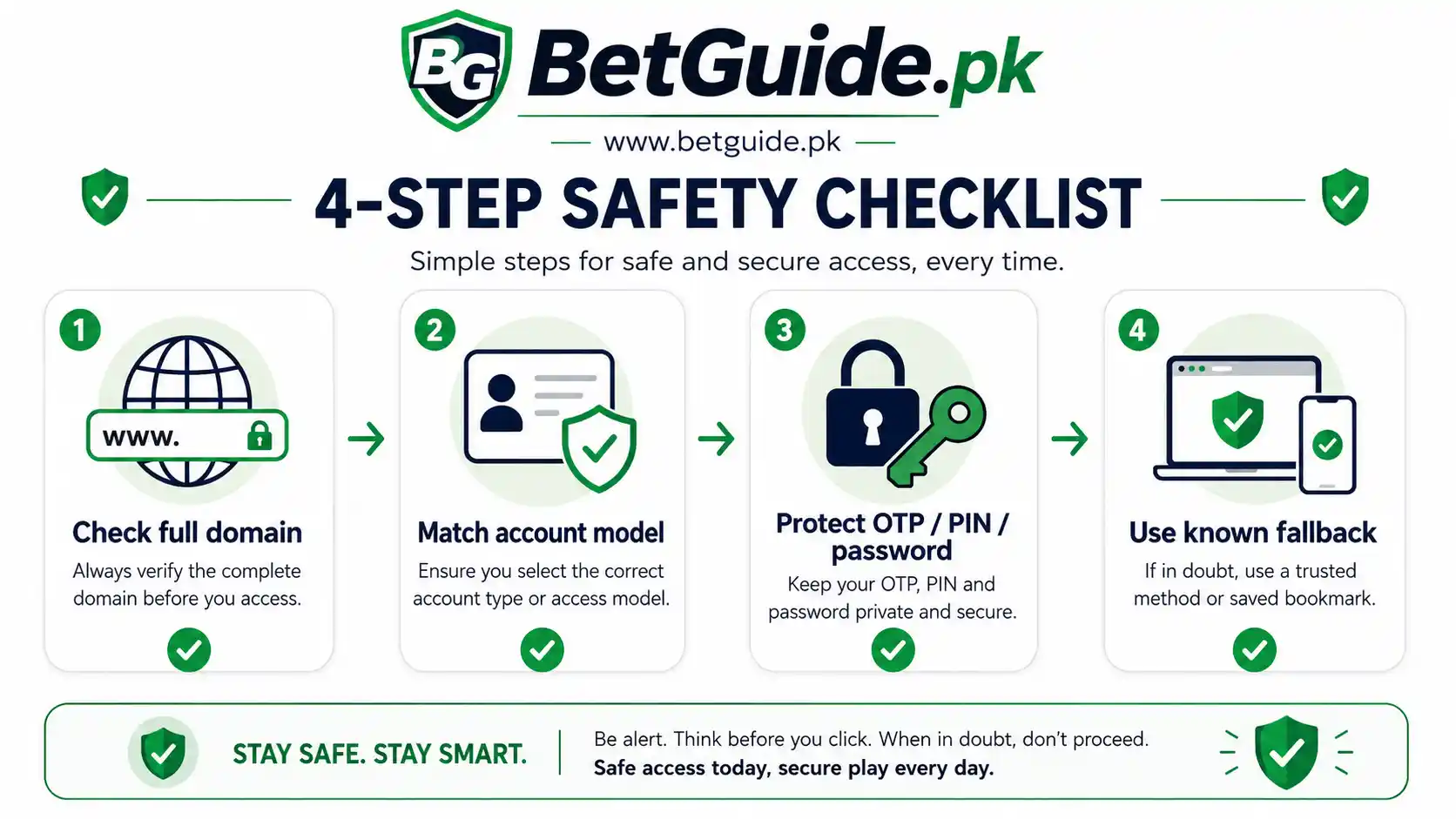
Start with the complete domain. Look for spelling changes, extra hyphens, added words, unusual top-level domains, or a link that arrived through an unsolicited message.
Next, compare the login model with the account you actually have. If your platform identity is an issued username and password but the new page asks you to “create wallet” with email, phone, and a new password, treat that as a separate service until proven otherwise.
Then inspect what the page wants immediately after login. Does it ask for an OTP, banking PIN, card security code, remote-access permission, email password, or phone unlock code? Those are not details you should hand to an unknown contact or page.
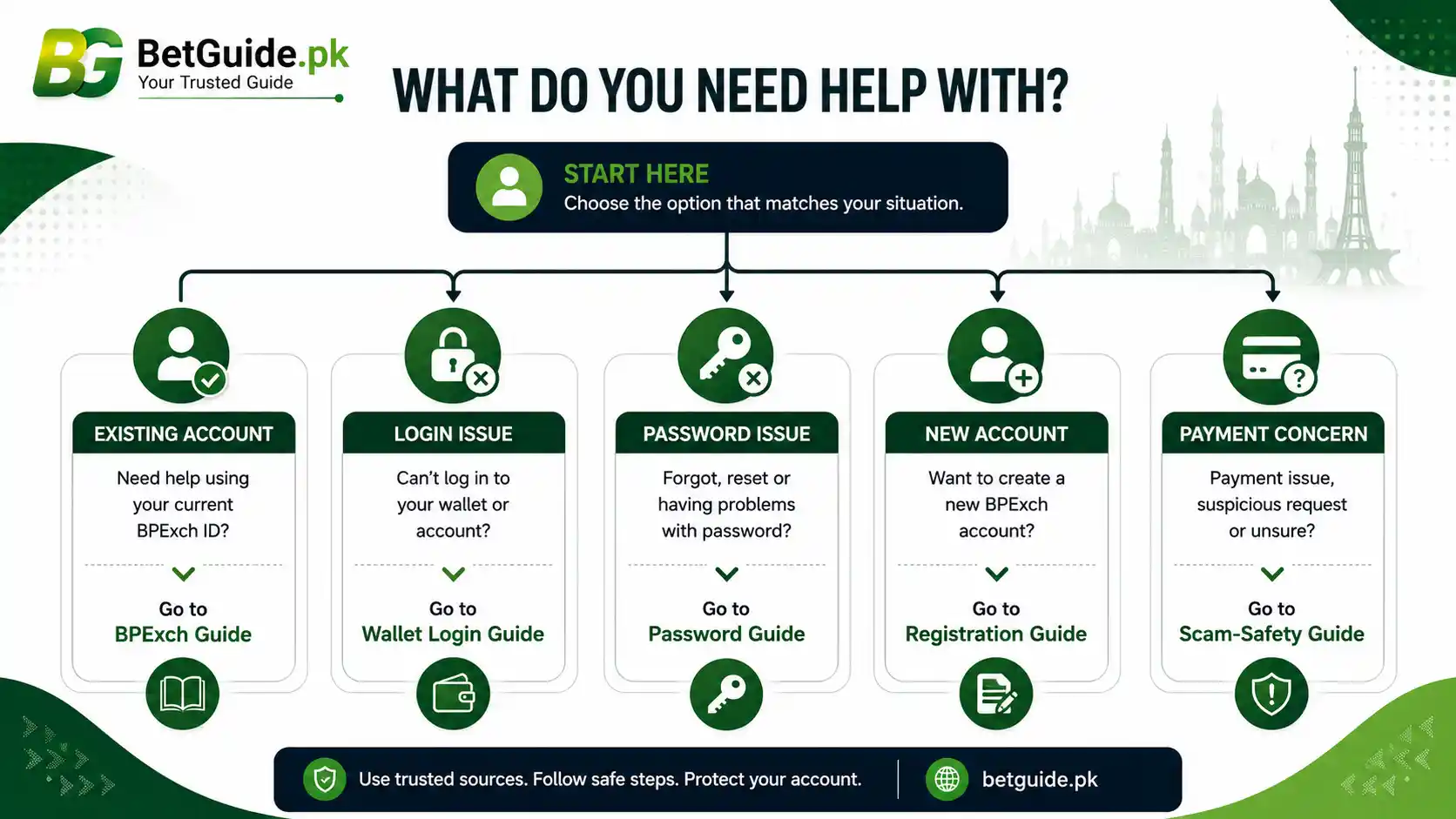
Finally, check whether the claimed function has a safer route. A balance question may be answered inside the platform account. A login problem belongs in the wallet-login guide. A registration question belongs in the BPExch Registration guide. A payment concern belongs in the payment-safety workflow.
Balance, Wallet and Payment Instructions Are Different Things
The word “wallet” can make several separate steps feel like one. They are not.
Your account balance is the amount displayed inside the relevant account environment. A wallet or cashier interface may be a tool used to request or manage payments. A payment instruction tells you where and how to send or receive funds. Each needs its own verification.
A visible balance does not prove that a new recipient number is correct. A successful login does not prove that a payment screenshot is current. A familiar wallet logo does not prove that a WhatsApp contact is connected to your account.
BetGuide.pk therefore does not publish permanent recipient numbers in evergreen articles. When payment instructions matter, use the current platform or provider route and verify the recipient before sending funds. For warning signs, read the Betting Payment Scams Pakistan guide.
Do Not Treat Deposit and Withdrawal Claims as Universal
Different BPExch Wallet pages currently publish different claims about minimum deposits, minimum withdrawals, fees, processing times, verification documents, supported payment methods, and approval steps.
Your account may have conditions that differ from another portal, provider, promotion, or point in time. A fixed number copied into an article can become unsafe if it later changes or belongs to a different service.
Before a deposit, confirm the current recipient, account title, amount conditions, and purpose. Before a withdrawal, confirm the current process inside the relevant account or through the provider route you can verify.
Do not send extra money because someone says a withdrawal needs an “unlock fee,” “tax release,” “verification payment,” or similar charge unless you have independently confirmed the requirement through the correct service.
What to Do if a Wallet Site Asks You to Register Again
Do not register immediately.
First, decide whether you already have the account needed for BPExch access. If you hold a valid BetPro ID, the normal platform identity already exists for the ecosystem covered by BetGuide.pk.
Second, identify why the other page wants a separate registration. It may operate a different support or payment portal. If so, ask whether that additional account is actually required for your situation and how it connects to the credentials you already use.
Third, avoid reusing the same password across unrelated services. Even if the new page is legitimate, password reuse creates unnecessary risk if one service is compromised.
If you are genuinely a new user and need the account flow explained, use the BPExch Registration guide and BetPro ID Pakistan page rather than guessing from a wallet signup form.
Password, OTP and PIN Safety
Your account password should remain private. The same applies to OTPs, banking PINs, wallet PINs, card security codes, email passwords, recovery codes, and device unlock codes.
An OTP is normally designed to confirm an action for the person who controls the account or phone. If someone asks you to read the code aloud or forward a screenshot, stop and verify the situation.
Do not give remote-control access to your phone so a stranger can “fix” a BPExch Wallet login. Remote-access tools can expose messages, banking apps, saved passwords, notifications, and payment information.
When a password genuinely fails, use the documented recovery route. The BetPro ID Password guide is the correct place for detailed recovery guidance.
Security is easier when you separate authentication help from payment help instead of sharing every detail with one unknown contact.
BPExch Wallet App Safety on Android
Android gives users flexibility to install applications from outside Google Play, but that flexibility increases the need for source checks.
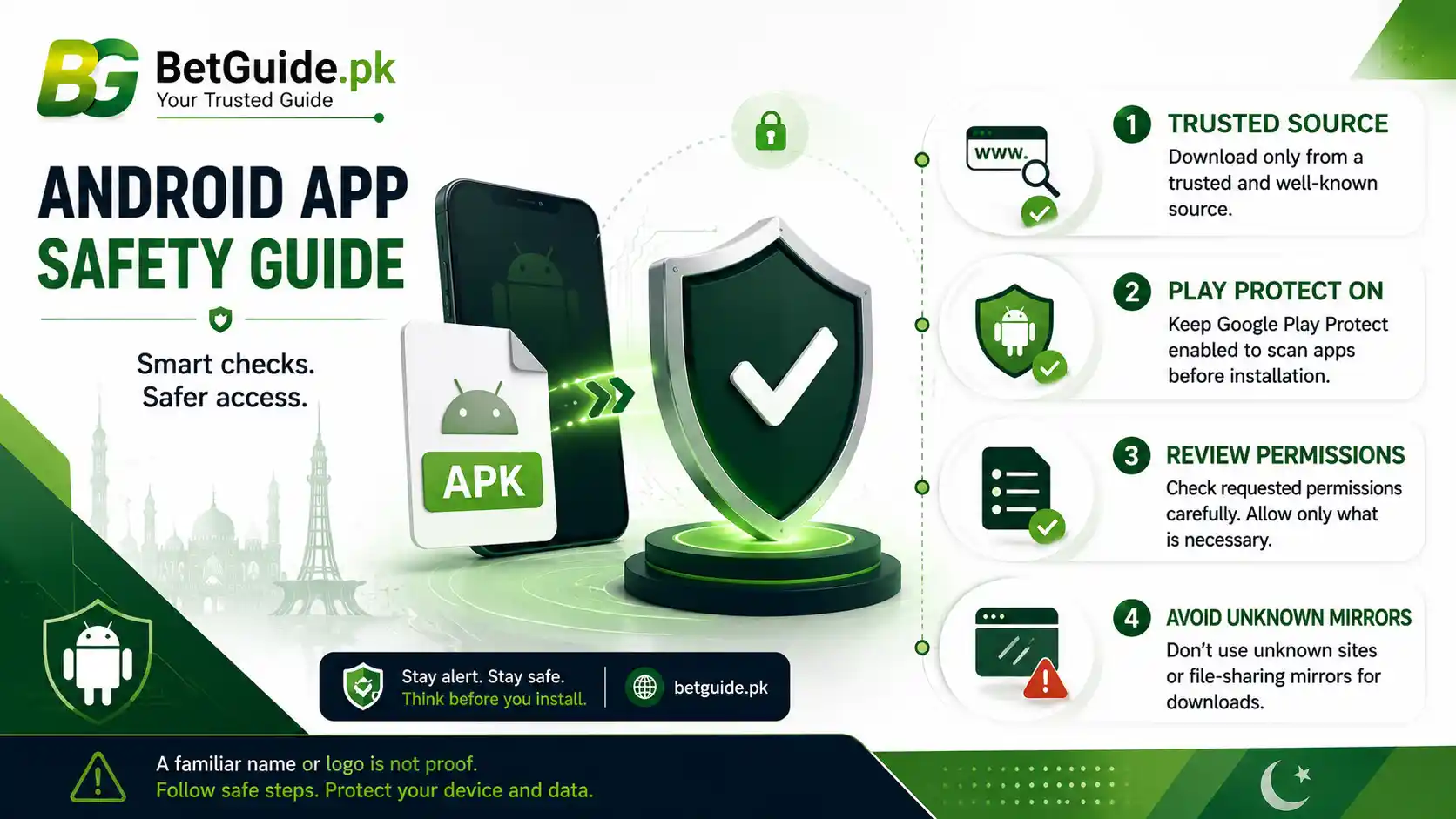
Google warns that apps downloaded from unknown sources can put a device and personal information at risk. Google Play Protect can scan for potentially harmful apps, warn users, and in some cases block or remove harmful software. Google recommends keeping Play Protect on.
Pakistan’s National CERT also advises users to install apps from trusted sources, avoid third-party hosting sites, review requested permissions, and not disable Play Protect.
Those recommendations apply whether the file is called BPExch Wallet, BetPro Wallet, BPExch APK, or anything else.
Do not assume that turning off a security feature is a normal installation step. If an unknown page tells you to disable Play Protect permanently, ignore Android warnings, or grant broad permissions without explanation, stop and verify the app source again.
What if BPExch Wallet Login Stops Working?
Identify whether the problem belongs to the platform account or the separate wallet page.
If the normal BPExch login still works with your issued username and password, the core account may be fine. A failure on a separate BPExch Wallet page can then be investigated as a portal-specific issue.
If both fail, retype your credentials carefully, check the confirmed domain, and avoid old autofill. Do not create a replacement account as your first response.
Use the BetPro Wallet Login guide for the detailed login workflow. If the problem is clearly password-related, move to the BetPro ID Password guide.
Fake or Unrelated Wallet Warning Signs
A familiar name can be copied. Look beyond the logo.
Warning signs include an unsolicited download, a newly introduced payment recipient, pressure to act quickly, requests for sensitive codes, instructions to disable security protections, promises of guaranteed withdrawals, or claims that additional payments are required to release funds without a verifiable explanation.
Be cautious when a page describes itself as “official,” “verified,” “licensed,” or “secure” but provides no evidence you can independently check. Those words are marketing claims until supported.
If a page feels wrong, stop. Use the BetGuide.pk Contact page for guidance about the site’s current documented routes, but never send BetGuide.pk your password, OTP, PIN, or banking login.
Roman Urdu: Seedhi Baat
Agar aap already BetPro ID use kar rahe hain, sirf “BPExch Wallet” naam dekh kar naya account mat banayein. Pehle check karein ke aap kis service par hain aur kya woh aapke existing BPExch/BetPro account se linked hai.
Username, password, OTP, wallet PIN, banking PIN ya recovery code kisi unknown person ko share na karein. Agar koi naya wallet page email, phone number ya naya password maang raha hai, usay separate service samajh kar verify karein.
Payment ke liye purana screenshot ya forwarded number use na karein. Current recipient aur instructions confirm karein. APK unknown WhatsApp, Telegram, file-sharing page ya copied website se install na karein, aur Play Protect band na karein.
Agar login issue hai to pehle confirmed web route test karein. Naya account banana ya random app install karna pehla solution nahin hona chahiye.
Trade-offs
What BetGuide.pk Cannot Confirm Universally
BetGuide.pk can document the BPExch/BetPro account relationship it has verified and the confirmed access domains covered by the main BPExch page. It cannot certify every separate site, app, APK, wallet portal, payment recipient, support contact, or search result that uses the same branding.
It also cannot responsibly publish one universal BPExch Wallet minimum deposit, minimum withdrawal, processing time, verification-document requirement, OTP process, app version, or fee without current account-specific evidence.
That limitation is useful, not a gap to hide. When information differs between services or changes over time, the correct answer is to verify the current route rather than convert a third-party claim into a permanent instruction.
Why We Do Not Publish a Fixed BPExch Wallet APK
APK files and download locations can change. Old files can remain indexed or be copied to mirrors long after the original route changes.
Publishing a fixed BPExch Wallet APK without a currently approved source would create a false sense of certainty. It could also lead users toward a package that BetGuide.pk has not verified.
The main BPExch guide therefore keeps app guidance cautious and does not state a fixed version. This article follows the same rule.
If a current approved route is confirmed later, the dedicated app article can own the download and installation details. Until then, web access is the safer fallback when you cannot verify the file.
Why a Search Ranking Does Not Prove Ownership
Google ranks pages for many reasons, including relevance, quality signals, links, freshness, and how well a page appears to answer a query. A high position does not function as a certificate that a business, wallet, app, or payment portal belongs to the entity named in the query.
Convenience Does Not Remove Financial Risk
A wallet interface can make deposits, balances, and withdrawals feel simple, but real-money betting still carries financial risk.
Do not treat a smooth payment process as evidence that a betting outcome is likely to succeed. Do not chase losses because your balance is easy to reload. Never use borrowed money or money needed for rent, food, bills, education, health care, or family responsibilities.
Set spending and time limits before you begin. If betting starts affecting your finances, mood, sleep, work, or relationships, stop and use the Responsible Gaming guide.
BetGuide.pk is an independent informational website. It does not operate BPExch, hold customer balances, process bets, guarantee withdrawals, or promise returns. This material is for adults 18+.
Next Steps
Choose the Correct Route for Your Situation
If you already have a working BetPro ID, start with the BPExch Pakistan guide and use the known account route. Do not create another wallet account simply because a search result asks you to register.
If the problem is specifically wallet login, use BetPro Wallet Login. If the password itself is failing, use the BetPro ID Password guide.
If you are a new user trying to understand account creation, use BPExch Registration and the BetPro ID Pakistan guide.
If a payment request looks suspicious, do not send money until the recipient and purpose are verified. Use the Betting Payment Scams guide for warning signs.
If an APK source cannot be confirmed, stay with verified web access rather than guessing.
FAQs
Is BPExch Wallet the same as a BetPro ID account?
The BPExch access ecosystem covered by BetGuide.pk uses the issued BetPro ID credentials, but “BPExch Wallet” is also used online for separate wallet-style portals and apps. Do not assume every result is the same service. Compare it with the account route you already use.
Do I need a separate BPExch Wallet login?
Not necessarily. If you already have valid BPExch/BetPro credentials, first use the confirmed platform route. A separate page asking for email, phone number, or new registration may be a different service and should be verified before you enter information.
Is there a confirmed BPExch Wallet APK download?
BetGuide.pk does not currently publish a fixed BPExch Wallet APK version or universal download URL in this article. Use a current verified source when one is confirmed, keep Play Protect enabled, and avoid unknown APK mirrors or files sent through unsolicited messages.
Conclusion
Before you use a BPExch Wallet page, identify what it actually is. Confirm whether you are looking at your existing BPExch/BetPro account, a separate wallet portal, a payment service, or an Android app.
Start from the account credentials and access route you already know. If those work, do not create a second account without a clear reason. If login fails, follow the dedicated recovery guide. If a payment instruction changes, verify it before sending funds. If an APK source is unclear, do not disable security protections or install a random file.
Keep your password, OTP, wallet PIN, banking PIN, email password, and recovery codes private. Use BetGuide.pk’s current platform guides to choose the right next step, and stop whenever a page or contact asks for information that does not fit the service you intended to use.
BPExch Wallet access should become clearer after verification, not more complicated.
References
BetGuide.pk’s BPExch Pakistan guide, BetPro ID Pakistan guide, BetPro Wallet Login article, payment-scam guide, and Responsible Gaming page provide the internal account and safety context used here. For Android safety, see Google Play Protect, Android guidance on apps from other sources, and Pakistan National CERT’s mobile-app advisory. Check current platform guidance before entering credentials, installing software, or sending money.