
Fake Betting Apps in Pakistan: Critical Safety Guide 2026
Fake Betting Apps in Pakistan: Critical Safety Guide 2026
TL;DR
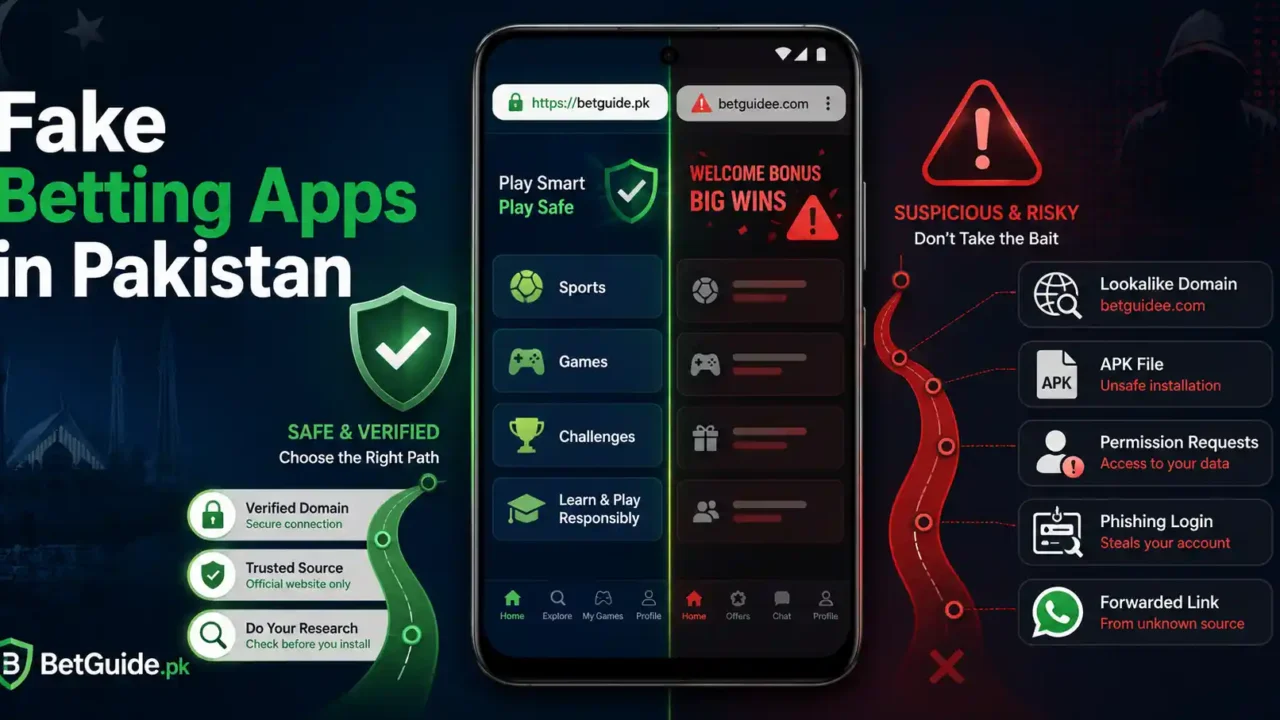
Fake betting apps in Pakistan can look convincing because a copied logo, familiar colour scheme, polished login screen, or forwarded APK does not prove who created the software. The safer approach is to verify the entire access chain before installing anything: where the download came from, whether the domain is the one you intended, who publishes the app, what permissions it requests, and where the login or payment action ultimately leads. BetGuide.pk’s purpose here is practical: help adults distinguish a normal platform access route from a cloned app, phishing page, unsafe APK, or fake support message before credentials or money are exposed.
A useful rule is simple: install last, verify first. Google recommends downloading Android apps from Google Play where possible and warns that apps from unknown sources can put both the device and personal information at risk. Google Play Protect checks apps for potentially harmful behaviour, including apps installed from outside Google Play, and can warn, disable, or remove harmful software. Pakistan’s National CERT has separately warned that malicious Android applications can masquerade as legitimate tools, request sensitive permissions, and extract personal or financial data.
Do not treat a Play Store listing as absolute proof either. Pakistan’s National CERT has documented suspicious applications that appeared on Google Play, which means store presence is one signal. Check the developer, listing details, permissions, support information, website relationship, and the exact action the app asks you to perform.
If you have already installed something suspicious, stop using it, review permissions, remove the app, change exposed passwords from a device you trust, review financial accounts if payment information may have been exposed, and preserve evidence. Individual cybercrime complaints in Pakistan can be reported through the National Cyber Crime Investigation Agency. For platform-specific app and login routes, use BetGuide.pk’s Betting App, Login and Password Help Centre instead of relying on a forwarded file.
This guide is for adults aged 18 or older. Betting involves financial risk and cannot guarantee profit. Safety checks reduce avoidable digital risk; they do not make betting risk-free.
Context: Why Fake Betting Apps Are Hard to Spot
A fake betting app does not need to look amateurish. Modern scam pages and repackaged Android applications can copy logos, icons, colours, button labels, promotional artwork, and even familiar login wording. A convincing appearance therefore answers the wrong question. The important question is not “Does this look like the brand?” but “Can I verify the route from the source to the action I am being asked to take?”
That distinction matters in Pakistan because betting-related access is often discovered through search results, WhatsApp messages, social media, dealer contacts, copied download pages, or direct browser links. Each extra handoff creates another place where a user can be sent to the wrong domain, an outdated file, a lookalike page, or software from an unknown developer.
The Government of Pakistan has also publicly directed action against illegal surrogate betting, gambling, and casino companies operating through apps and websites. That regulatory environment can contribute to changing availability, blocked routes, copied domains, and confusing search results. It does not mean every unavailable domain is a scam, and it does not make every accessible app trustworthy. It simply makes independent verification more important.
BetGuide.pk therefore separates three questions that are often mixed together. First, is the platform or account route the one the user intended? Second, is the software or website technically trustworthy enough to receive credentials? Third, is the user making a financially responsible decision? Passing one check does not automatically pass the others.
A Fake App Can Be a Login Trap Without Being Sophisticated Malware
Some harmful apps aim to install malware or collect device data. Others may only need to steal a username, password, OTP, wallet PIN, banking credential, or recovery code. A cloned login screen can therefore be dangerous even if the app never asks for contacts, photos, or microphone access.
Phishing works by making the destination feel familiar enough that the victim provides information voluntarily. Google Chrome’s Safe Browsing guidance describes unsafe sites as pages that may trick people into giving away passwords or personal information, and Chrome can warn about phishing, malware, social engineering, and slightly altered lookalike URLs.
This is why “the app opened normally” is not a meaningful safety test. A fake app can open perfectly, show a polished login page, and still send credentials somewhere they do not belong.
What Works: How to Check Fake Betting Apps in Pakistan
The most reliable method is a staged verification process. Do not jump from “I found a download” directly to “I installed it.” Move through source, identity, permissions, login, and payment checks in that order. If one stage fails, stop there instead of using later stages to rationalise the risk.
1. Start From the Platform Guide, Not the Download Button
A download button is only useful after you know which access route applies to that platform. Some services use a browser-first model. Others may have an Android app. An app route can change over time, and a file that was once valid may become outdated.
Start with the relevant platform guide or BetGuide.pk’s app and login help centre. Confirm whether the current guidance says browser access, Google Play, a platform-controlled download page, or no approved APK route. Do not assume that because one betting platform uses an APK, another one does too.
This single step prevents a common mistake: searching for “[brand] APK” and accepting the first page that offers a file. Search ranking, an advertisement, a familiar logo, or a filename is not proof that the file came from the service you intended.
2. Check the Full Domain Before You Tap Download
Lookalike domains often depend on small differences that are easy to miss on a phone screen. Extra words, swapped letters, unusual subdomains, additional hyphens, or a different top-level domain can create an address that feels familiar without being the same destination.
Read the full hostname, not just the page title or logo. If a message uses a shortened link, do not assume the visible message text tells you where the link will end. If Chrome shows a “Dangerous site,” “Fake site ahead,” or similar warning, Google recommends not visiting the unsafe page.
A secure connection icon is not enough by itself. HTTPS protects data in transit to the site you opened; it does not prove that the site is the company you intended. Identity still needs to be established separately.
3. Use a Five-Link Trust Chain Before Installing
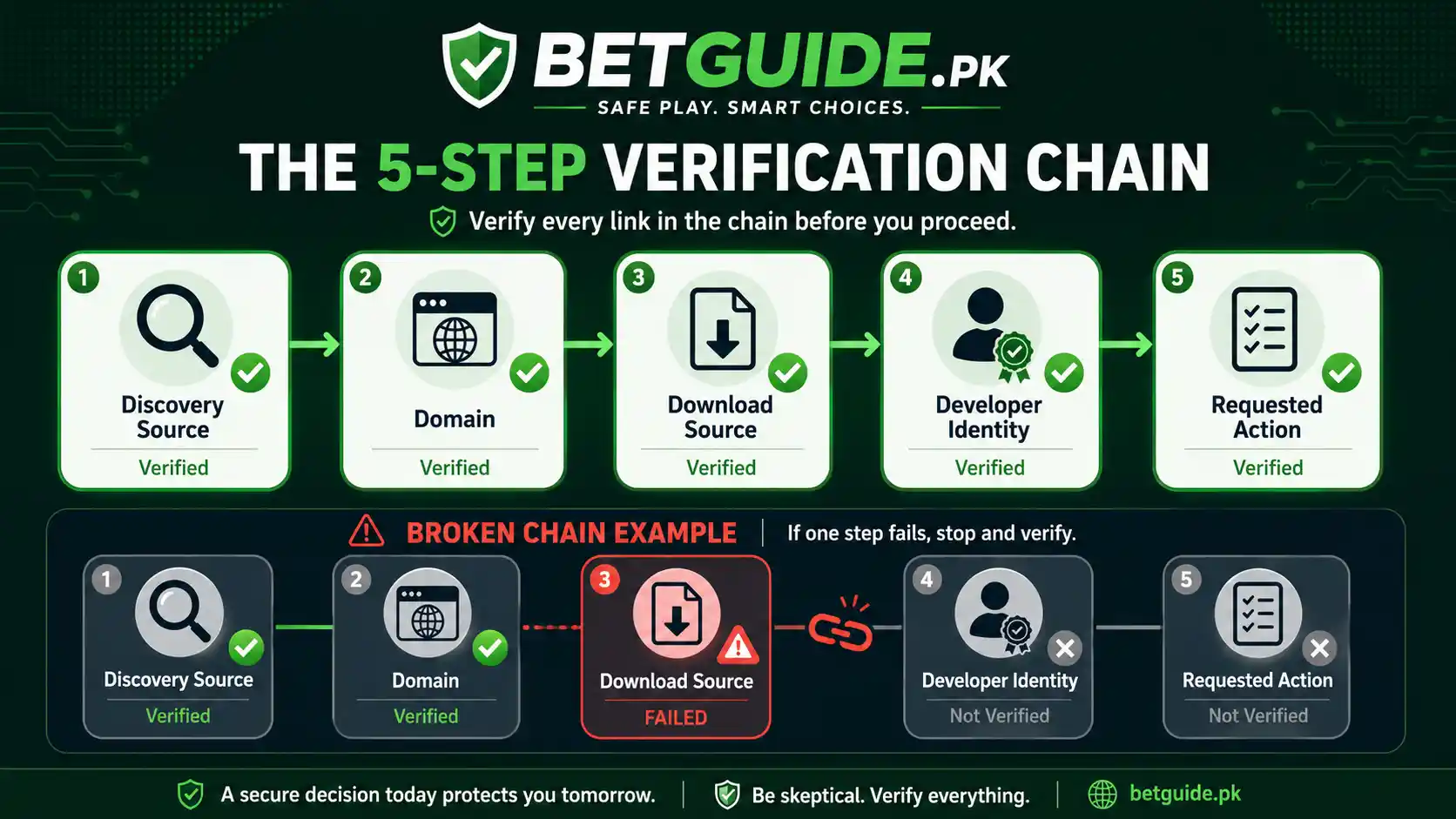
BetGuide.pk recommends a simple five-link trust chain for any betting app:
Discovery source → domain → download source → developer identity → requested action.
If you found the app through a message, can you independently verify the domain? If the domain points to an app store, does the developer identity make sense? If the developer is unfamiliar, does the listing provide a credible website, privacy policy, support channel, and consistent description? Once installed, does the app ask for an action that matches its stated purpose?
A break anywhere in that chain is a reason to stop.
4. Keep Google Play Protect Turned On
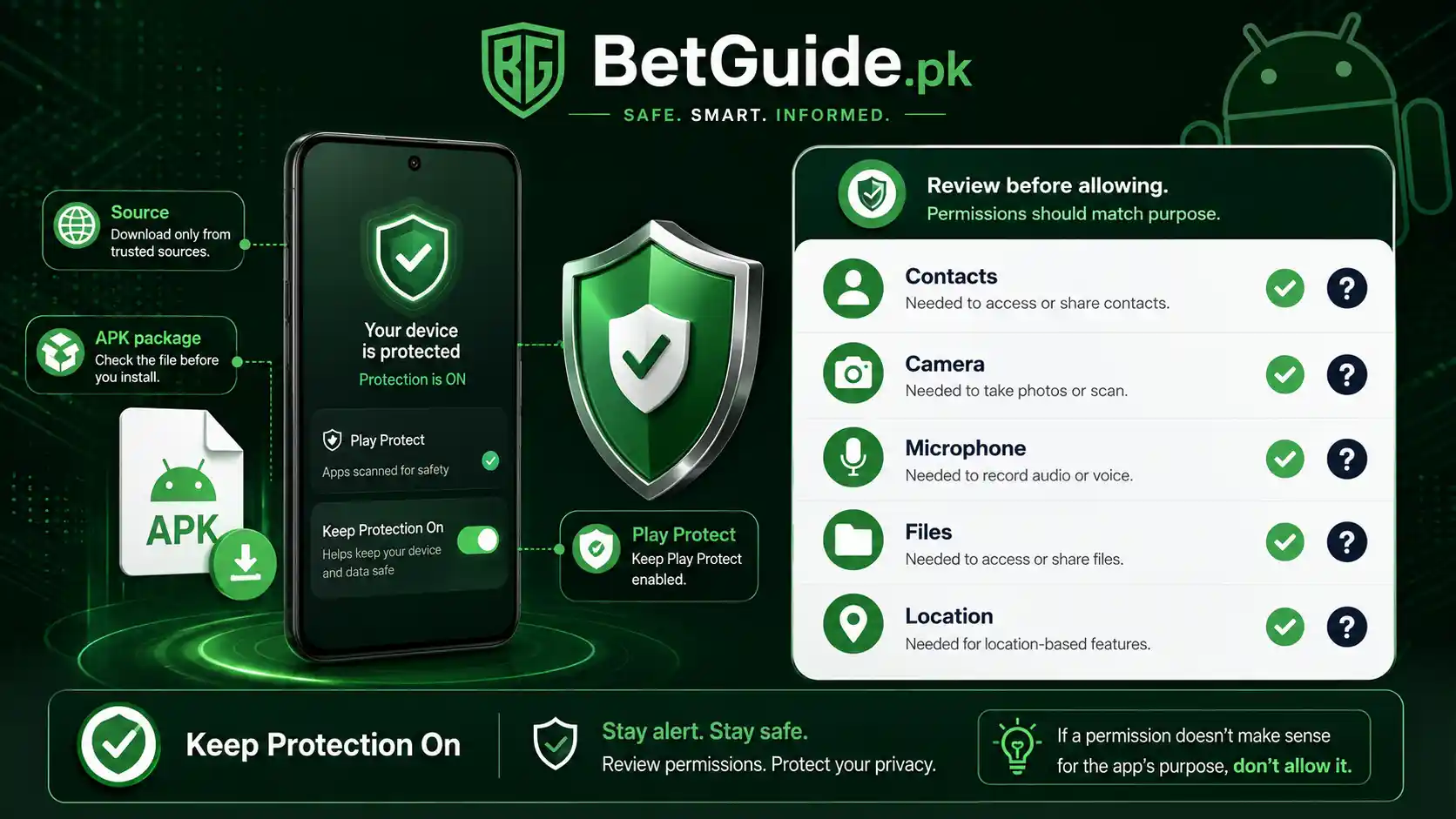
Google Play Protect is enabled by default on Android and checks apps for harmful behaviour. Google says it performs safety checks on Play Store apps, scans apps from other sources, warns about potentially harmful software, and may deactivate or remove harmful apps.
For security, Google recommends keeping Play Protect enabled. National CERT Pakistan makes the same recommendation in its Android-app advisory. If an installer, message, video, or support contact tells you that disabling Play Protect is a required step, treat that as a serious warning sign rather than routine troubleshooting.
Play Protect is an important layer, but it is not a substitute for source verification. A clean scan does not prove that you chose the correct brand, account portal, payment recipient, or support contact.
5. Review Permissions Before Giving the App Access
Android permissions control access to features and information such as the camera, microphone, contacts, files, location, and other device capabilities. Google allows users to review and change app permissions in Android settings.
Ask whether each permission has a clear relationship to what the app is supposed to do. A request is not automatically malicious simply because it is sensitive, but unexplained or excessive access deserves scrutiny. National CERT specifically advises users to review permissions and avoid unnecessary access.
Be cautious when an app pushes you to change restricted device settings. Android’s own guidance warns that harmful apps may ask users to alter settings that put device data at risk. A legitimate explanation should be specific, understandable, and consistent with the app’s function.
6. Separate App Installation From Account Registration
Installing an app and opening a betting account are different decisions. A user who does not yet have an account should not treat a download page as proof of the correct registration process. Platform account models vary, including direct self-registration and dealer-issued credentials.
If the app asks you to create an account, verify that the registration method matches the current platform guide before providing personal information. If you already have credentials, do not create a second account merely because a new app or domain asks you to “register again.”
Keeping installation and registration separate also improves lead safety. A prospective customer should understand which account route applies before trusting an app with a mobile number, identity details, password, or payment instruction.
7. Never Send Passwords, OTPs, PINs, or Recovery Codes to “Support”
A fake app is often paired with fake support. The app may display a WhatsApp number, Telegram contact, popup, or chat message telling the user that verification requires a password, OTP, PIN, wallet PIN, banking login, card security code, or recovery code.
BetGuide.pk’s support guidance does not require private authentication secrets. The Help Centre lists requests for passwords, OTPs, unknown APK files, remote-access codes, lookalike domains, and unexpected payment changes among common fake-support warning signs.
An OTP exists to prove control of an account or transaction. Giving it to another person can let that person act as you. Treat anyone asking for an OTP as someone requesting authentication power, not merely “helping with verification.”
8. Treat Forced Updates and New APK Links as Fresh Decisions
Scam distribution often relies on urgency: “old version stopped,” “new APK required,” “update now,” or “your account will be blocked.” Even when an update is genuinely needed, the new file should be verified from the beginning.
Do not assume a file is safe because an earlier version was safe. Check the current source, developer, domain, permissions, and platform guidance again. If the update arrives through an unexpected message rather than the route you normally use, verify it independently before opening the link.
The same applies when a previously working domain stops loading. Availability problems can have many causes. A replacement link sent at the perfect moment can still be a phishing opportunity.
9. Do Not Use Payment Success as Proof That the App Is Genuine
A small deposit appearing to work does not validate an app. Scammers can accept money, show fabricated balances, or allow an initial transaction while controlling the interface. Payment success and software identity are separate questions.
Before sending money, verify current recipient details through the proper route and keep the transaction reference. The Betting Payment Scams guide covers fake receipts, payment-detail changes, duplicate-transfer pressure, and transaction-specific warning signs in more depth.
This article deliberately keeps that boundary. Fake betting apps in Pakistan focuses on software, domains, login pages, permissions, and app-linked impersonation; payment scams deserve their own detailed checks.
10. Be Suspicious of Remote-Control Requests
A support contact should not need unrestricted remote control of your phone simply to explain an app login problem. Requests to install screen-sharing or remote-access software can expose messages, OTPs, wallet notifications, banking sessions, stored photos, and other sensitive information.
If someone claims that remote access is the only way to activate, update, recover, or “verify” a betting app, stop and use an independently verified support route. Do not approve accessibility, screen-capture, device-admin, or similar powerful controls without understanding exactly why they are required.
The safest troubleshooting process usually starts with non-sensitive information: platform name, device type, browser or app route, visible error message, and whether the user is on the intended domain.
11. Use Separate Passwords for Betting and Important Accounts
Password reuse turns one stolen login into several compromised accounts. If a fake betting login collects a password that is also used for email, banking, social media, or another betting platform, the damage can spread beyond the original app.
Use a unique password for each important service. Google’s phishing guidance recommends changing a password when Chrome warns that it may have been compromised, and it strongly discourages reusing the same credentials across sites.
Email deserves special protection because password-reset messages often arrive there. If an attacker gains email access, changing only the betting password may not fully restore control.
12. Take Extra Care With APK Files Shared in WhatsApp or Telegram
An APK is an Android application package. The file type itself is not proof of harm, but a forwarded APK removes many context signals that a store listing or platform-controlled page can provide. You may not know who built it, whether it was modified, or whether it is still the intended version.
Google warns that installing apps from unknown sources can put the device and personal information at risk. National CERT advises avoiding third-party hosting sites and installing from trusted sources.
If the relevant BetGuide.pk platform guide does not currently verify an APK route, do not fill the gap with a random mirror. Browser access may be the safer fallback until the source can be confirmed.
13. Stop When the App Creates Artificial Urgency
Urgency is powerful because it shortens verification. Messages such as “install within ten minutes,” “deposit now to unlock the account,” “send OTP before session expires,” or “your ID will be deleted” push users toward action before they can check the source.
A legitimate time-sensitive event can exist, but urgency does not remove the need for verification. Pause the action, navigate independently to the known platform or help route, and confirm the instruction without using the link or contact that created the pressure.
This principle also supports responsible gaming. Financial and account decisions are safer when they are not made under excitement, frustration, fear, or pressure.
Trade-offs: What Safety Checks Can and Cannot Prove
No checklist can certify every betting app as safe. App stores remove harmful software, domains change, developers update code, support channels are impersonated, and platform access arrangements can change. A safety guide should therefore reduce avoidable risk without creating false confidence.
Google Play Is Safer Than Random Sideloading, but Not Infallible
Google recommends Play Store downloads, and Play Protect adds meaningful screening. At the same time, National CERT Pakistan has documented suspicious Android apps that appeared on Google Play. These facts are not contradictory. Store review and device scanning reduce risk; they do not make impersonation, privacy problems, or malicious behaviour impossible.
The practical conclusion is layered verification. Prefer trusted distribution, keep security protections enabled, and still check identity, permissions, and behaviour.
A Correct Domain Does Not Make Betting Financially Safe
Technical authenticity and responsible gambling are separate issues. A genuine app can still involve real-money loss. A secure login does not improve the odds of a bet, guarantee withdrawals, or make chasing losses safer.
Before depositing, set spending and time limits and use only money you can afford to lose. BetGuide.pk’s Responsible Gaming guide provides a stop-now plan, warning signs, and safer-use checks.
A Security Warning Is Evidence, Not an Invitation to Override It
Browsers and Android may sometimes produce warnings that a user believes are mistaken. The temptation is to search for instructions on bypassing the warning. For a betting login or financial app, the better response is to verify independently first.
Google’s Chrome guidance specifically recommends not visiting sites marked dangerous. Google also recommends keeping Play Protect on. Overriding a warning should never become the default installation process merely because a forwarded message says the file is “safe.”
Next Steps: What to Do Before and After a Suspicious App
If you have not installed the app yet, stop at the source. Find the relevant platform guidance independently, check the full domain, confirm whether an app is actually required, and prefer the currently verified route. Do not let a promotional bonus, urgent message, or promise of easier withdrawals rush the decision.
If you installed the app but have not entered credentials, review its permissions and source before using it further. If the app is suspicious, uninstall it and keep Play Protect enabled. If you entered a reused password, change that password anywhere else it was used, starting with your email and other sensitive accounts.
If you exposed an OTP, banking login, wallet PIN, card security information, or recovery code, treat the situation as more urgent. Contact the relevant financial provider through its independently verified channel, review recent activity, and secure affected accounts. Do not continue chatting with the person who requested the secret.
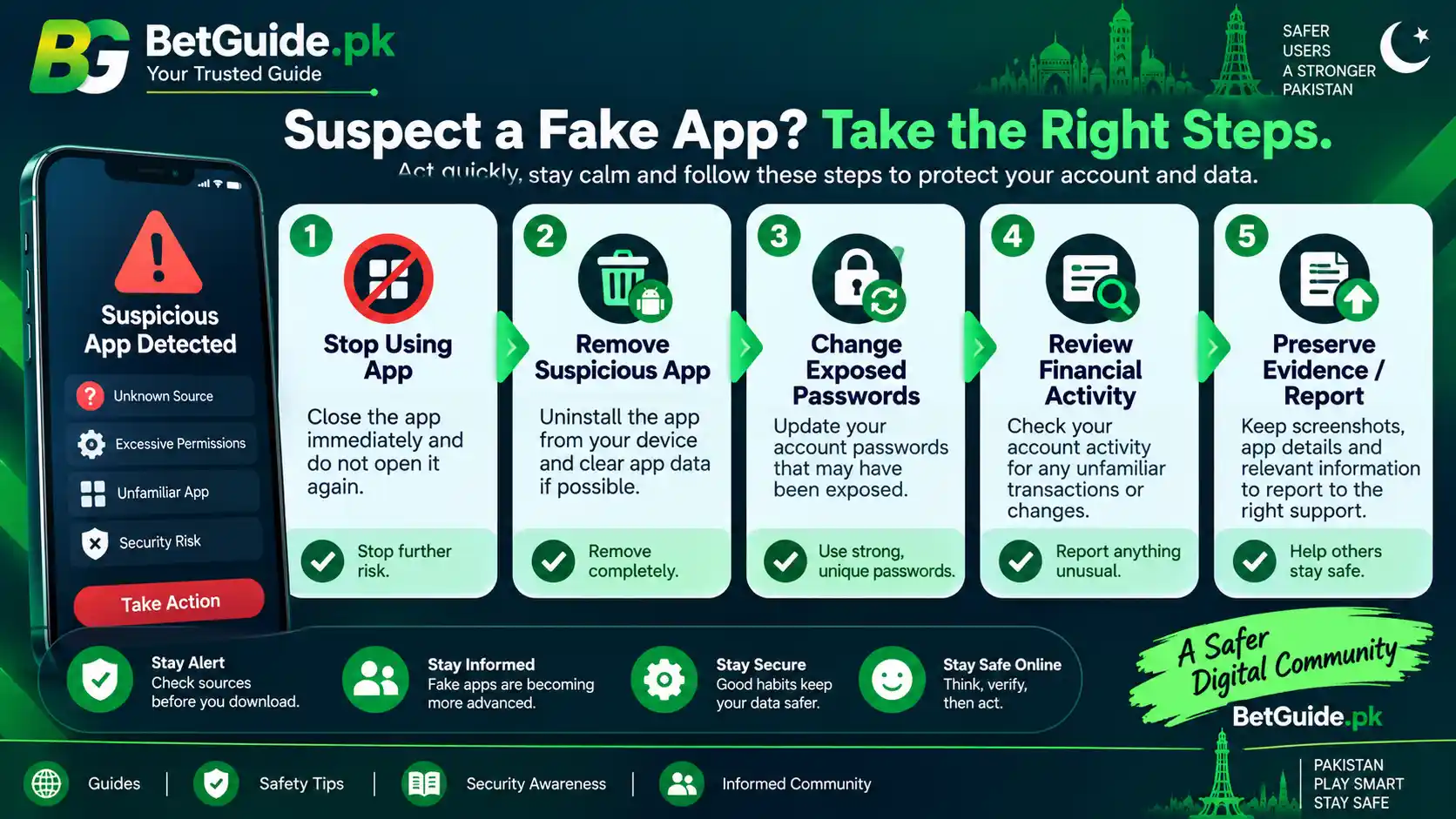
If money was lost or you believe you were targeted by cybercrime, preserve screenshots, transaction references, phone numbers, usernames, domains, messages, and file details where safe to do so. National CERT Pakistan states that individual online fraud and financial-scam complaints fall under the National Cyber Crime Investigation Agency rather than its organisational incident form. NCCIA provides an official complaint form and Cybercrime Reporting Centres.
For a questionable BetGuide.pk link, platform route, or factual statement, use the BetGuide.pk contact page and identify the exact page or link. Do not include passwords, OTPs, PINs, banking credentials, or unnecessary personal information.
FAQ: How can I tell whether a betting APK is fake?
Do not judge by the logo or filename. Verify the platform’s current app route, the full domain, download source, developer identity, permissions, support information, and what the app asks you to do. Keep Google Play Protect enabled, and avoid third-party APK mirrors when the platform’s current route cannot be independently confirmed.
FAQ: Is a betting app safe if it is on Google Play?
Google Play is generally a safer source than an unknown download site, and Google recommends using it where possible. However, store presence is not an absolute guarantee. National CERT Pakistan has documented suspicious Android applications on Google Play, so users should still check the developer, permissions, listing details, app behaviour, and platform relationship.
FAQ: What should I do if I entered my password into a fake betting app?
Stop using the app and change the exposed password from a device you trust. If that password was reused, change it on every other account where it appears, especially email and financial services. Review account activity, remove the suspicious app, keep security scanning enabled, and report cybercrime to NCCIA if fraud or account compromise occurred.
References
This guide uses Google Play Protect guidance for information about Android app scanning, harmful-app warnings, and Google’s recommendation to keep Play Protect enabled. Google’s Android app download guidance supports the warning that apps from unknown sources can put devices and personal information at risk.
Android permission guidance explains how users can review and change app permissions, while Google’s restricted settings guidance warns that harmful apps may ask users to change settings that place device data at risk.
Google Chrome unsafe-site guidance supports the phishing, malware, social-engineering, lookalike-domain, and browser-warning sections. Google recommends not visiting sites marked dangerous.
The National CERT Pakistan Android-app advisory is the Pakistan-specific cybersecurity source for malicious apps masquerading as legitimate tools, sensitive-permission risks, data exfiltration, trusted-source installation, permission review, and keeping Play Protect enabled.
The Government of Pakistan Press Information Department notice provides context on official directions concerning illegal surrogate betting, gambling, and casino companies operating through apps and websites in Pakistan. It is cited for regulatory context only, not as a legal opinion about any particular platform or user.
The NCCIA cybercrime guidance and official complaint portal are the sources for individual cybercrime reporting routes in Pakistan. National CERT’s own incident-reporting page also directs individual online fraud and financial-scam complaints to NCCIA.
Conclusion
Before installing any betting app, verify the route before you trust the interface. Use the BetGuide.pk App, Login and Password Help Centre to find platform-specific guidance, check the current source, and keep private credentials out of support chats and forwarded forms.
If the app route is unclear, browser access may be safer than guessing with an APK. If an instruction suddenly changes the download source, payment destination, permissions, or account process, treat that change as a reason to verify again.
BetGuide.pk provides general information for adults aged 18 or older. It does not guarantee that an app, platform, account, deposit, withdrawal, or betting outcome will be available or successful. Betting involves financial risk. Set limits before participating, never chase losses, and stop when the activity affects essential money, wellbeing, sleep, work, or relationships.