
JeetBuzz App Download: Safe Essential APK Guide 2026
JeetBuzz App Download: Safe Essential APK Guide 2026
TL;DR
A JeetBuzz app download in Pakistan should start with source verification, not with the first APK result you see in search. The current JeetBuzz app page documents Android installation, so Android is the clearest verified mobile-app path today. Before downloading, check the full destination, confirm that the page is really about JeetBuzz, and avoid files shared through unknown groups, messages, or mirror sites.
For a safer JeetBuzz app download, keep Google Play Protect active, review Android warnings, and allow installation only for the browser or file manager you trust. After installation, sign in with the same registered account details you already use on the verified website. If the app fails but the website works, troubleshoot the app before changing a working password.
Do not assume that “latest version,” “old version,” “free APK,” or “Uptodown” proves a file is current or authentic. Those are search terms, not verification signals.
Need a new account instead of an app fix? Use our JeetBuzz Pakistan account guide. This article focuses on download, installation, login, updates, iOS access, app deposits, and troubleshooting.
This guide also separates app problems from account problems, so you can avoid unnecessary password resets, duplicate accounts, and risky replacement files during troubleshooting.
Context
What Is the JeetBuzz App?
The JeetBuzz app is a mobile access option for the JeetBuzz platform. The current JeetBuzz app page today explains how Android users can download and install the app. That makes the Android APK the strongest verified app path we can describe without guessing.
A JeetBuzz app download usually means getting an APK file. APK stands for Android Package Kit. Android uses this file type to install apps outside Google Play. That does not make every APK unsafe, but it does mean the source deserves more attention.
BetGuide.pk is an independent information site. We do not operate JeetBuzz, hold user balances, process bets, or guarantee withdrawals, availability, bonuses, or profits.
Is the JeetBuzz App Available in Pakistan?
For a JeetBuzz app download in Pakistan, verify the destination before entering any account or payment details. JeetBuzz pages can redirect, and numbered domains can appear in the platform’s current web flow. A redirect is not automatically fake, but it is a reason to slow down and check what page you reached.
If you cannot confidently verify the app route, use the mobile website instead. A browser gives you a useful fallback while you confirm the current mobile-app source.
Android APK vs Mobile Website
A JeetBuzz app download gives Android users an installed app icon and direct access from the phone. That can be convenient if you use the platform regularly.
The mobile website needs no APK. You open the verified web destination in a browser, log in, and use the account there. This can be simpler on phones with low storage or when the app has an update problem.
What About JeetBuzz on iPhone?
Searches for “jeetbuzz for ios” and “jeetbuzz app for ios” show that iPhone users want a clear answer.
The first-party app documentation we can verify currently focuses on Android installation. We therefore do not want to claim that a dedicated JeetBuzz App Store application definitely exists for the same account flow unless the platform clearly confirms one.
An iPhone user searching for a JeetBuzz app download should begin with the verified mobile website. Do not install an unknown configuration profile, enterprise certificate, or app file simply because a third-party page says it is the iOS version.
What Works
How to Complete a JeetBuzz App Download Safely
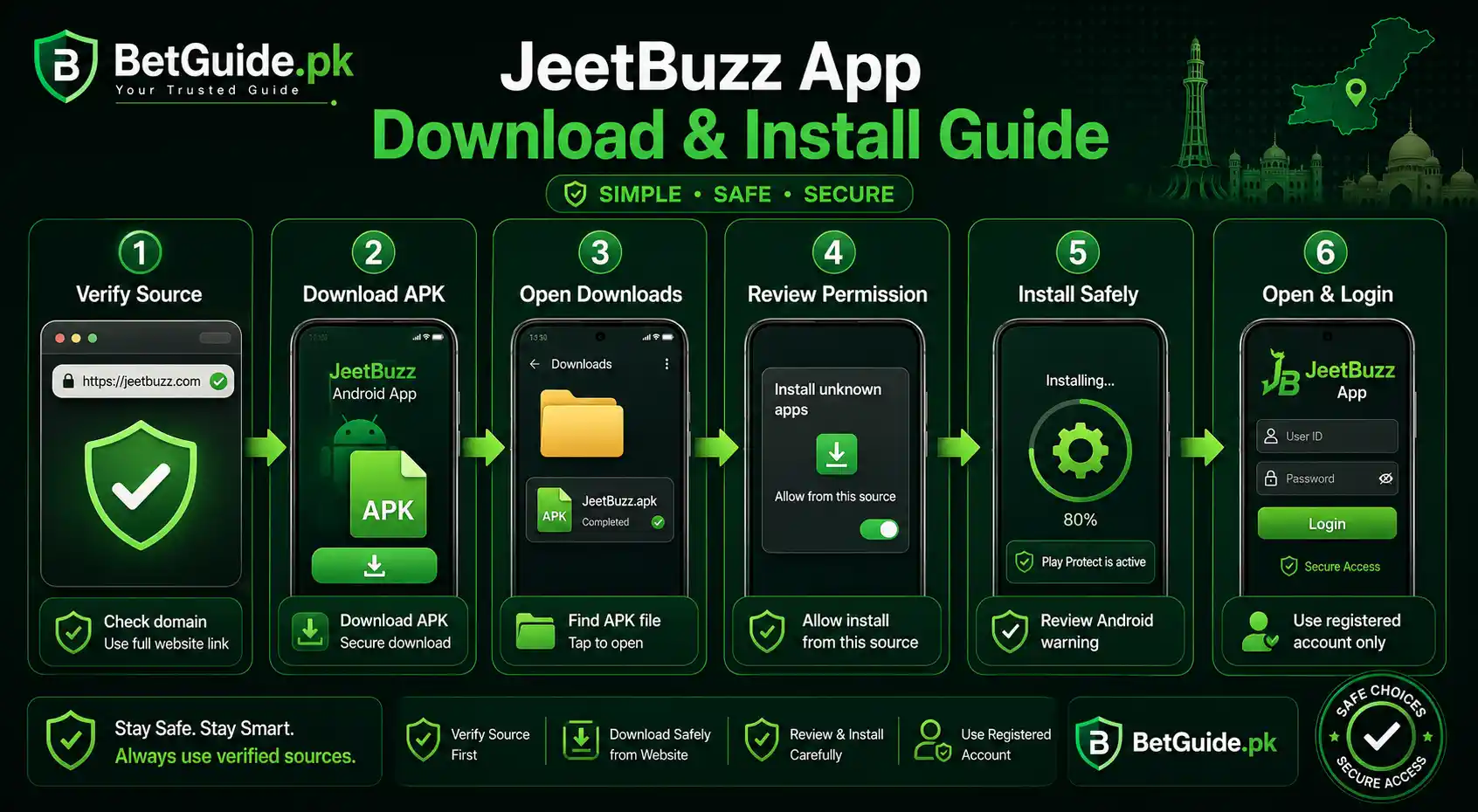
A safer JeetBuzz app download starts before the APK reaches your phone.
First, open a JeetBuzz destination you have independently verified. Do not start from a file forwarded by a stranger, a Telegram group, a random WhatsApp message, or an unknown APK mirror.
Second, check the full address before you tap the download button. Look for unusual spelling, extra words, or unrelated branding.
Third, use the app option shown by the verified platform route. The current JeetBuzz app page describes Android installation.
Fourth, let Android show its normal security checks. Do not disable protection just because a page tells you that a warning is “normal.” Read the warning first.
Finally, use your existing registered credentials after installation. Do not create a second account simply because you downloaded a new app.
JeetBuzz App Download for Android
Android is the main platform covered by the current app instructions.
Before starting a JeetBuzz app download for Android, check that your phone has enough free storage. Low storage can interrupt the download, block installation, or make the app unstable after it opens.
After the APK finishes downloading, open it from the notification or the Downloads folder. Android may tell you that the browser or file manager is not allowed to install apps from that source.
If you trust the source, allow installation only for that specific browser or file manager. You do not need to give every app on your phone permission to install other apps.
Keep Google Play Protect active. Google says Play Protect checks apps for potentially harmful behavior and can inspect apps installed outside Google Play.
How to Check a JeetBuzz APK Before Installing
A JeetBuzz app download should pass basic checks before installation.
Start with the source. A file reached through a verified platform path is easier to trust than the same filename uploaded to an unknown mirror.
Check the file type. Android application packages normally end in .apk. If you expected an Android app but received a ZIP, EXE, document, or another unexpected format, stop.
Make sure the download completed. A partial or damaged APK can cause “App not installed” errors or fail to open.
Review Android security messages. A warning does not always mean a file is malicious, but it should never be ignored without understanding what Android is telling you.
After installation, review permissions as they appear. Do not approve every request by habit. Ask whether the requested access makes sense for the feature you are using.
Remember that successful installation does not prove every payment, promotion, withdrawal, or platform feature will work as expected.
How to Install the JeetBuzz APK on Android
Once you have verified the source, tap the downloaded APK.
Android may display a message saying the browser or file manager cannot install unknown apps. Menu names vary by phone. If you choose to continue, allow installation only for the specific source you used.
Return to the APK and select Install.
During a JeetBuzz app download, keep Play Protect enabled. Google recommends using Play Protect because it can warn about potentially harmful apps, including apps obtained outside Google Play.
Read any Android warning before continuing.
When installation finishes, open the app. Review any permission request rather than tapping Allow on everything.
If installation fails, do not immediately search for a different file. Use the troubleshooting section below before switching sources.
JeetBuzz App Login After Installation
After successful installation, existing users should use their registered account details rather than create another account.
Open the app and find the login form. Enter the same account identifier and password used with your existing JeetBuzz account.
Check capital letters, spaces, and saved autofill. Old credentials stored by your phone can cause a valid login to fail.
Complete any security check shown by the current login screen.
If you forgot your password, use the recovery option shown on the verified platform or follow the current support process. Never send your password or OTP to a person claiming they need it to “activate” the app.
If you need a new account, use our JeetBuzz registration and login guide for Pakistan. That parent guide owns signup, KYC, broader login, and payment information.
JeetBuzz App Kaise Download Karein?
Agar aap Pakistan mein JeetBuzz app download karna chahte hain, pehle source verify karein. Random website, WhatsApp group, Telegram file, ya unknown APK page se app install na karein.
Verified JeetBuzz page par mobile app option mile to Android APK download karein. File complete hone ke baad Downloads folder se open karein.
Android agar browser ya file manager ke liye installation permission maange, to sirf usi source ko permission dein jo aap ne use kiya hai. Har app ko install permission dene ki zarurat nahi.
Download ke waqt Google Play Protect ko band karna first step nahi hona chahiye. Agar phone strong security warning de, source dobara check karein.
App install hone ke baad apni registered JeetBuzz ID ya username aur password use karein. Agar login fail ho, same details verified website par test karein.
Password, OTP, wallet PIN, banking PIN, ya phone PIN kisi unknown person ko share na karein.
Agar APK install nahi hoti, storage, download file, permission, old app version, aur Android compatibility check karein. Issue solve na ho to mobile website temporary fallback ke taur par use karein.
JeetBuzz App Latest Version: What Should You Check?
People often add “latest version” because they want a file that still works with the current platform.
The problem is that version numbers can change faster than articles. A third-party page can also label an older file “latest” without proving anything.
We therefore avoid hard-coding an APK version unless the current verified platform clearly confirms it.
For a JeetBuzz app download apk latest version search, focus on the source before the number. A verified current route is more useful than a version claim copied across several download sites.
If the app already works, do not reinstall it only because another page advertises a newer package.
If the platform shows an update prompt, check where that prompt leads before downloading. If the update fails, check storage, download the file again, and look for a conflict with an older installation.
Use the mobile website while you troubleshoot. A working website can also confirm that your account remains accessible.
JeetBuzz App Download Old Version: Should You Use One?
Some users search for a JeetBuzz app download old version because the current APK does not install or because an older phone has compatibility problems.
An old APK is not automatically a solution.
Older files may be incompatible with current services. They may contain outdated code. A third-party archive may also provide a file that cannot be verified.
Do not downgrade just because the newest installation fails.
First, check free storage. Download the current file again. Review installation permission. Restart the phone. Check whether another version of the app is already installed.
If the current platform specifically provides an older compatible package for your device, follow those verified instructions. Otherwise, the mobile website is a cleaner fallback than downloading an unknown archive.
A safer strategy prioritizes a current, verifiable source over a version number.
Should You Download JeetBuzz From Uptodown?
The query “jeetbuzz app download for android latest version uptodown” mixes two intents. The user wants JeetBuzz, but also wants a particular third-party download service.
We do not recommend choosing an APK mirror simply because it ranks for that phrase.
A third-party source adds questions. Who uploaded the package? Is it the current file? Was it modified? Does the package still connect to the platform? Is the listed version really current?
For a JeetBuzz app download, start with a platform route you can verify. If that route is unavailable, use the mobile website while confirming the current app source rather than jumping to an unknown package.
The same rule applies to Uptodown and other mirrors. Treat the mirror name as a source choice, not as proof of authenticity.
JeetBuzz App Deposit: What Happens After Login?
App users may search about deposits once they reach the account.
If deposit options are available, they should appear inside the current account dashboard, wallet, cashier, or payment area. Methods, limits, fees, verification steps, and availability can change.
Before sending money, confirm the account and instructions displayed inside the verified platform.
Do not send funds to a personal wallet or bank account only because someone in a message claims the payment route has changed.
If the recipient or payment method changes unexpectedly, pause and verify it through the current platform support route.
For broader payment, KYC, signup, and withdrawal information, see the main JeetBuzz Pakistan guide.
JeetBuzz APK Not Installing? Try These Fixes
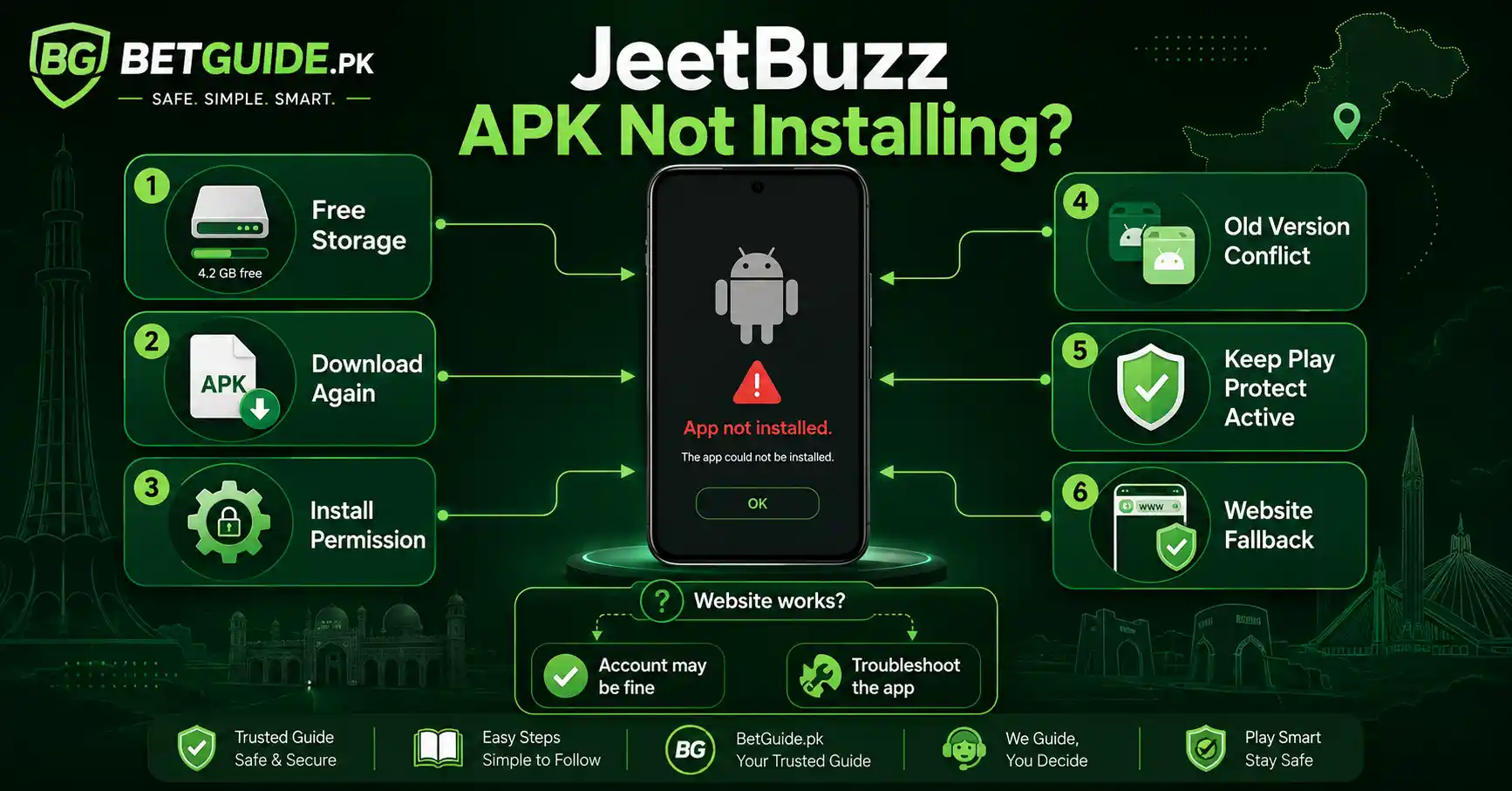
Sometimes a JeetBuzz app download finishes correctly but Android still refuses to install the APK.
Start with free storage. If the phone is nearly full, remove files or unused apps and try again.
Next, download the APK again from the verified route. An interrupted or damaged file can fail even when the filename looks correct.
Check the installation permission for the browser or file manager you used.
Look for an older JeetBuzz installation that may conflict with the new package.
Keep Play Protect active and read its warnings. Google says Play Protect can warn about potentially harmful apps and may block or remove harmful software.
If the same APK still fails after these checks, avoid random mirrors. Use the mobile website while you confirm whether the current APK supports your device.
“App Not Installed” Error
The “App not installed” message can have several causes.
Check available storage. Download the APK again. Confirm the source-specific installation permission. Look for an existing app version that may conflict.
If the verified JeetBuzz app download continues failing, use the browser version until the compatibility or package issue is resolved.
JeetBuzz APK Downloaded but Will Not Open
Confirm that the file ends in .apk and that the download completed.
If nothing happens, check whether the browser or file manager has permission to start app installation. Restart the device and try again.
If the file remains unresponsive, repeat the JeetBuzz app download from the verified route.
Do not replace it with a random old version simply because another file opens.
JeetBuzz App Keeps Closing
If the problem began after a new JeetBuzz app download or update, confirm that the installed package came from the intended route.
You can review the app settings and clear temporary cache where appropriate. Be careful with Clear Data because that can remove local settings and saved login information.
If the app continues to close, test the mobile website.
When the website works normally but the app crashes, the issue may be app-specific or device-specific rather than an account failure.
JeetBuzz App Login Not Working
If login fails after a JeetBuzz app download, separate the app problem from the account problem.
If the app does not open at all, focus on installation, device compatibility, storage, or the app package.
If the app opens but rejects the login, retype the registered identifier and password. Check capitalization, spaces, and autofill.
Then open the verified JeetBuzz website and test the same credentials.
If the website accepts the login but the app does not, your account is probably still accessible. Focus on the app version, installation, cache, or device.
If both the website and app reject the login, focus on the account identifier, password recovery, destination, or account status.
Use the current recovery or support process when needed. Never provide a password, OTP, banking PIN, wallet PIN, or email password to an unknown contact.
This website-versus-app test is one of the fastest ways to avoid unnecessary password resets and risky APK downloads.
Trade-offs
JeetBuzz App vs Mobile Website: Which Is Better?
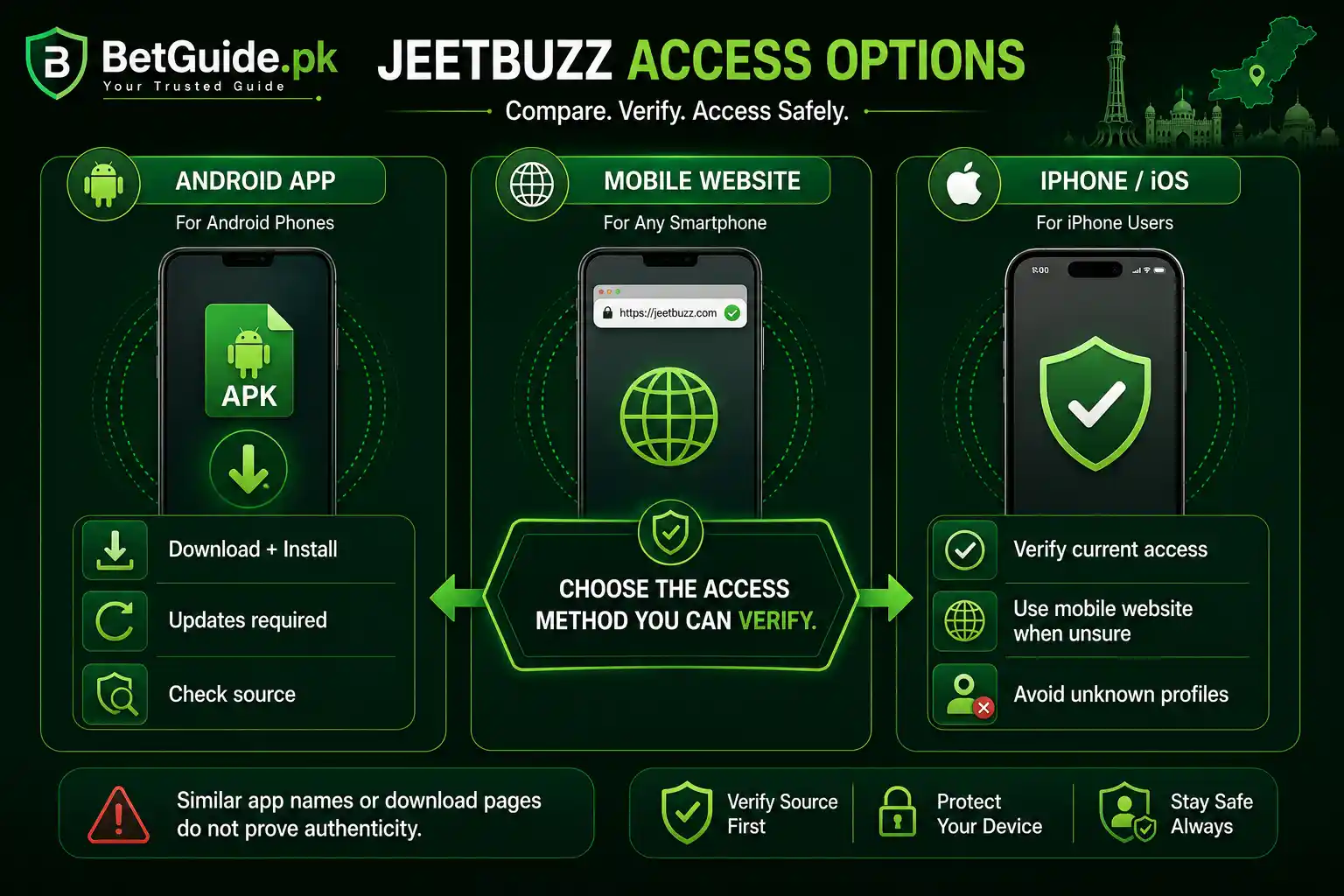
A JeetBuzz app download can make repeat mobile access convenient. The app sits on your home screen and may reduce the need to navigate through a browser each time.
The mobile website has a different advantage. It requires no APK installation, takes less device storage, and can keep working when an app update fails.
The app needs maintenance. You may need to install updates, manage permissions, and troubleshoot compatibility.
The website needs a verified destination. If platform domains change, you still have to check where you are logging in.
For most users, the best approach is flexible. Use the app when you can verify it and it works well. Keep the mobile website as a fallback.
Is a JeetBuzz App Download Safe?
No independent website can honestly promise that a JeetBuzz app download, APK, website, or betting platform is 100 percent safe.
What you can do is reduce avoidable risk.
Verify the source. Keep Play Protect active. Read Android warnings. Review permissions. Avoid modified APKs and unknown archives. Protect your password and OTP.
Google explains that Play Protect checks apps for potentially harmful behavior and can inspect apps from outside Google Play.
Remember that app security and financial risk are separate. A file that installs cleanly does not guarantee withdrawals, platform uptime, bonus eligibility, account access, or profits.
Use betting services only when you meet the applicable age and legal requirements. Set spending limits before you play and never treat betting as guaranteed income.
Why We Do Not Recommend Random JeetBuzz APK Mirrors
An unknown mirror makes a JeetBuzz app download harder to verify.
You may not know who uploaded the file, whether it is current, whether it was repackaged, whether the package matches the platform, or why it requests certain permissions.
Words such as “free,” “latest version,” “old version,” and “APK download” are marketing or search phrases. They are not security checks.
A mirror can also remain online after its file becomes outdated.
BetGuide.pk therefore prefers a current route that can be connected to the platform or, when that cannot be confirmed, the mobile website.
Next Steps
JeetBuzz App Quick Start
For a JeetBuzz app download in Pakistan, begin with a JeetBuzz destination you have independently verified.
Check the full page before downloading.
On Android, download the APK, keep Play Protect active, review the source-specific installation permission, and read any security warning.
After installation, log in with your existing registered account.
If the app fails but the mobile website works, troubleshoot the app before resetting a valid password.
If the APK will not install, check storage, the downloaded file, installation permission, old version conflicts, and device compatibility.
If you need an account rather than an app fix, read our JeetBuzz Pakistan account, signup and safety guide.
If you use an iPhone, start with the verified mobile website unless JeetBuzz clearly provides a current iOS method.
If a stranger sends you an APK, iOS profile, password request, OTP request, or unusual payment instruction, stop and verify it before taking action.
How Do I Complete a JeetBuzz App Download in Pakistan?
Start from a JeetBuzz destination you have independently verified. Use the current Android app option, download the APK, keep Play Protect active, and review installation warnings. Avoid files shared through unknown websites, groups, or unsolicited messages.
Where Can I Get the JeetBuzz APK for Android?
The current JeetBuzz app documentation describes Android download and installation. For a JeetBuzz app download, use a current route you can verify rather than choosing an APK mirror only because it appears high in search results.
Does JeetBuzz Have an iPhone App?
The current first-party app instructions we can verify focus on Android. An iPhone user searching for a JeetBuzz app download should use the verified mobile website unless the platform clearly provides a current iOS or App Store option. Avoid unknown iOS profiles or enterprise certificates.
Conclusion
Need Help With Your JeetBuzz App Download?
If your JeetBuzz app download will not start, install, update, open, or accept your login, work through the troubleshooting steps above before downloading a different APK.
First confirm the source. Then check the phone. Then test the same account on the verified website. That order helps separate a download problem from an account problem.
Need a new JeetBuzz account instead? Visit our JeetBuzz Pakistan guide for signup, login, password recovery, KYC, payment awareness, and broader platform guidance.
You can also use the WhatsApp help option on BetGuide.pk. Explain the problem clearly, but never send your password, OTP, wallet PIN, banking PIN, email password, or phone unlock code to an unknown person.
BetGuide.pk is an independent information website. We do not operate JeetBuzz, hold customer funds, process bets, guarantee withdrawals, or promise winnings.
Betting involves financial risk. Use only money you can afford to lose, set limits, and do not treat betting as a guaranteed source of income.
For every JeetBuzz app download, keep the same rule: verify the source, protect your account, install carefully, and use the mobile website as a fallback when the app is not working.